基础
https://www.bilibili.com/video/BV1Z44y1K7Fj?p=8&spm_id_from=pageDriver
源码地址:https://gitee.com/react-cp/react-pc-code
讲义地址:https://gitee.com/react-cp/react-pc-doc
react基础之一个简单的页面
<!DOCTYPE html>
<html lang="en">
<head>
	<meta charset="UTF-8">
	<title>hello_react</title>
</head>
<body>
	<!-- 准备好一个“容器” -->
	<div id="test"></div>
	<!-- 引入react核心库 -->
	<script type="text/javascript" src="../js/react.development.js"></script>
	<!-- 引入react-dom,用于支持react操作DOM -->
	<script type="text/javascript" src="../js/react-dom.development.js"></script>
	<!-- 引入babel,用于将jsx转为js -->
	<script type="text/javascript" src="../js/babel.min.js"></script>
	<script type="text/babel" > /* 此处一定要写babel */
		//1.创建虚拟DOM
		const VDOM = <h1>Hello,React</h1> /* 此处一定不要写引号,因为不是字符串 */
		//2.渲染虚拟DOM到页面
		ReactDOM.render(VDOM,document.getElementById('test'))
	</script>
</body>
</html>
这里重点是使用babel,将jsx转换程js,通过解析jsx 挂载到test标签里
使用jsx创建一个虚拟dom
<script type="text/babel" > /* 此处一定要写babel */
    //1.创建虚拟DOM
    const VDOM = (  /* 此处一定不要写引号,因为不是字符串 */
        <h1 id="title">
            <span>Hello,React</span>
        </h1>
    )
    //2.渲染虚拟DOM到页面
    ReactDOM.render(VDOM,document.getElementById('test'))
</script>
这里使用() 是js语法,通过括号标签进行换行。
使用js创建一个虚拟dom
<script type="text/javascript" >
    //1.创建虚拟DOM
    const VDOM = React.createElement('h1',{id:'title'},React.createElement('span',{},'Hello,React'))
    //2.渲染虚拟DOM到页面
    ReactDOM.render(VDOM,document.getElementById('test'))
</script>
虚拟dom和真实dom对比
<script type="text/babel" > /* 此处一定要写babel */
    //1.创建虚拟DOM
    const VDOM = (  /* 此处一定不要写引号,因为不是字符串 */
        <h1 id="title">
            <span>Hello,React</span>
        </h1>
    )
    //2.渲染虚拟DOM到页面
    ReactDOM.render(VDOM,document.getElementById('test'))

    const TDOM = document.getElementById('demo')
    console.log('虚拟DOM',VDOM);
    console.log('真实DOM',TDOM);
    debugger;
    // console.log(typeof VDOM);
    // console.log(VDOM instanceof Object);
    /*
            关于虚拟DOM:
                1.本质是Object类型的对象(一般对象)
                2.虚拟DOM比较“轻”,真实DOM比较“重”,因为虚拟DOM是React内部在用,无需真实DOM上那么多的属性。
                3.虚拟DOM最终会被React转化为真实DOM,呈现在页面上。
        */
</script>
jsx的语法规则
<script type="text/babel" >
    const myId = 'aTgUiGu'
    const myData = 'HeLlo,rEaCt'

    //1.创建虚拟DOM
    const VDOM = (
        <div>
            <h2 className="title" id={myId.toLowerCase()}>
                <span style={{color:'white',fontSize:'29px'}}>{myData.toLowerCase()}</span>
            </h2>
            <h2 className="title" id={myId.toUpperCase()}>
                <span style={{color:'white',fontSize:'29px'}}>{myData.toLowerCase()}</span>
            </h2>
            <input type="text"/>
        </div>
    )
    //2.渲染虚拟DOM到页面
    ReactDOM.render(VDOM,document.getElementById('test'))

    /*
            jsx语法规则:
                    1.定义虚拟DOM时,不要写引号。
                    2.标签中混入JS表达式时要用{}。
                    3.样式的类名指定不要用class,要用className。
                    4.内联样式,要用style={{key:value}}的形式去写。
                    5.只有一个根标签
                    6.标签必须闭合
                    7.标签首字母
                            (1).若小写字母开头,则将该标签转为html中同名元素,若html中无该标签对应的同名元素,则报错。
                            (2).若大写字母开头,react就去渲染对应的组件,若组件没有定义,则报错。

        */
</script>
js表达式和语句
一定注意区分:【js语句(代码)】与【js表达式】
1.表达式:一个表达式会产生一个值,可以放在任何一个需要值的地方
下面这些都是表达式:
(1). a
(2). a+b
(3). demo(1)
(4). arr.map()
(5). function test () {}
2.语句(代码):
下面这些都是语句(代码):
(1).if(){}
(2).for(){}
(3).switch(){case:xxxx}
react组件定义
<script type="text/babel">
    //1.创建函数式组件
    function MyComponent(){
        console.log(this); //此处的this是undefined,因为babel编译后开启了严格模式
        return <h2>我是用函数定义的组件(适用于【简单组件】的定义)</h2>
    }
    //2.渲染组件到页面
    ReactDOM.render(<MyComponent/>,document.getElementById('test'))
    /*
        执行了ReactDOM.render(<MyComponent/>.......之后,发生了什么?
                1.React解析组件标签,找到了MyComponent组件。
                2.发现组件是使用函数定义的,随后调用该函数,将返回的虚拟DOM转为真实DOM,随后呈现在页面中。
    */
</script>
类式组件
<script type="text/babel">
    //1.创建类式组件
    class MyComponent extends React.Component {
        render(){
            //render是放在哪里的?—— MyComponent的原型对象上,供实例使用。
            //render中的this是谁?—— MyComponent的实例对象 <=> MyComponent组件实例对象。
            console.log('render中的this:',this);
            return <h2>我是用类定义的组件(适用于【复杂组件】的定义)</h2>
        }
    }
    //2.渲染组件到页面
    ReactDOM.render(<MyComponent/>,document.getElementById('test'))
    /*
        执行了ReactDOM.render(<MyComponent/>.......之后,发生了什么?
                1.React解析组件标签,找到了MyComponent组件。
                2.发现组件是使用类定义的,随后new出来该类的实例,并通过该实例调用到原型上的render方法。
                3.将render返回的虚拟DOM转为真实DOM,随后呈现在页面中。
    */
</script>
组件三大属性之state
<script type="text/babel">
    //1.创建组件
    class Weather extends React.Component{

        //构造器调用几次? ———— 1次
        constructor(props){
            console.log('constructor');
            super(props)
            //初始化状态
            this.state = {isHot:false,wind:'微风'}
            //解决changeWeather中this指向问题
            this.changeWeather = this.changeWeather.bind(this)
        }

        //render调用几次? ———— 1+n次 1是初始化的那次 n是状态更新的次数
        render(){
            console.log('render');
            //读取状态
            const {isHot,wind} = this.state
            return <h1 onClick={this.changeWeather}>今天天气很{isHot ? '炎热' : '凉爽'},{wind}</h1>
        }

        //changeWeather调用几次? ———— 点几次调几次
        changeWeather(){
            //changeWeather放在哪里? ———— Weather的原型对象上,供实例使用
            //由于changeWeather是作为onClick的回调,所以不是通过实例调用的,是直接调用
            //类中的方法默认开启了局部的严格模式,所以changeWeather中的this为undefined

            console.log('changeWeather');
            //获取原来的isHot值
            const isHot = this.state.isHot
            //严重注意:状态必须通过setState进行更新,且更新是一种合并,不是替换。
            this.setState({isHot:!isHot})
            console.log(this);

            //严重注意:状态(state)不可直接更改,下面这行就是直接更改!!!
            //this.state.isHot = !isHot //这是错误的写法
        }
    }
    //2.渲染组件到页面
    ReactDOM.render(<Weather/>,document.getElementById('test'))

</script>
简写:
<script type="text/babel">
    //1.创建组件
    class Weather extends React.Component{
        //初始化状态
        state = {isHot:false,wind:'微风'}

        render(){
            const {isHot,wind} = this.state
            return <h1 onClick={this.changeWeather}>今天天气很{isHot ? '炎热' : '凉爽'},{wind}</h1>
        }

        //自定义方法————要用赋值语句的形式+箭头函数
        changeWeather = ()=>{
            const isHot = this.state.isHot
            this.setState({isHot:!isHot})
        }
    }
    //2.渲染组件到页面
    ReactDOM.render(<Weather/>,document.getElementById('test'))

</script>
组件三大属性之props
<script type="text/babel">
    //创建组件
    class Person extends React.Component{
        render(){
            // console.log(this);
            const {name,age,sex} = this.props
            return (
                <ul>
                    <li>姓名:{name}</li>
                    <li>性别:{sex}</li>
                    <li>年龄:{age+1}</li>
                </ul>
            )
        }
    }
    //渲染组件到页面
    ReactDOM.render(<Person name="jerry" age={19}  sex="男"/>,document.getElementById('test1'))
    ReactDOM.render(<Person name="tom" age={18} sex="女"/>,document.getElementById('test2'))

    const p = {name:'老刘',age:18,sex:'女'}
    // console.log('@',...p);
    // ReactDOM.render(<Person name={p.name} age={p.age} sex={p.sex}/>,document.getElementById('test3'))
    ReactDOM.render(<Person {...p}/>,document.getElementById('test3'))
</script>
props组件参数限制
<!-- 引入prop-types,用于对组件标签属性进行限制 -->
<script type="text/javascript" src="../js/prop-types.js"></script>
<script type="text/babel">
    //创建组件
    class Person extends React.Component{
        render(){
            // console.log(this);
            const {name,age,sex} = this.props
            //props是只读的
            //this.props.name = 'jack' //此行代码会报错,因为props是只读的
            return (
                <ul>
                    <li>姓名:{name}</li>
                    <li>性别:{sex}</li>
                    <li>年龄:{age+1}</li>
                </ul>
            )
        }
    }
    //对标签属性进行类型、必要性的限制
    Person.propTypes = {
        name:PropTypes.string.isRequired, //限制name必传,且为字符串
        sex:PropTypes.string,//限制sex为字符串
        age:PropTypes.number,//限制age为数值
        speak:PropTypes.func,//限制speak为函数
    }
    //指定默认标签属性值
    Person.defaultProps = {
        sex:'男',//sex默认值为男
        age:18 //age默认值为18
    }
    //渲染组件到页面
    ReactDOM.render(<Person name={100} speak={speak}/>,document.getElementById('test1'))
    ReactDOM.render(<Person name="tom" age={18} sex="女"/>,document.getElementById('test2'))

    const p = {name:'老刘',age:18,sex:'女'}
    // console.log('@',...p);
    // ReactDOM.render(<Person name={p.name} age={p.age} sex={p.sex}/>,document.getElementById('test3'))
    ReactDOM.render(<Person {...p}/>,document.getElementById('test3'))

    function speak(){
        console.log('我说话了');
    }
</script>
props简写:
<!-- 引入prop-types,用于对组件标签属性进行限制 -->
<script type="text/javascript" src="../js/prop-types.js"></script>

<script type="text/babel">
    //创建组件
    class Person extends React.Component{

        constructor(props){
            //构造器是否接收props,是否传递给super,取决于:是否希望在构造器中通过this访问props
            // console.log(props);
            super(props)
            console.log('constructor',this.props);
        }

        //对标签属性进行类型、必要性的限制
        static propTypes = {
            name:PropTypes.string.isRequired, //限制name必传,且为字符串
            sex:PropTypes.string,//限制sex为字符串
            age:PropTypes.number,//限制age为数值
        }

        //指定默认标签属性值
        static defaultProps = {
            sex:'男',//sex默认值为男
            age:18 //age默认值为18
        }

        render(){
            // console.log(this);
            const {name,age,sex} = this.props
            //props是只读的
            //this.props.name = 'jack' //此行代码会报错,因为props是只读的
            return (
                <ul>
                    <li>姓名:{name}</li>
                    <li>性别:{sex}</li>
                    <li>年龄:{age+1}</li>
                </ul>
            )
        }
    }

    //渲染组件到页面
    ReactDOM.render(<Person name="jerry"/>,document.getElementById('test1'))
</script>
函数组件中使用props
<!-- 引入prop-types,用于对组件标签属性进行限制 -->
<script type="text/javascript" src="../js/prop-types.js"></script>

<script type="text/babel">
    //创建组件
    function Person (props){
        const {name,age,sex} = props
        return (
                <ul>
                    <li>姓名:{name}</li>
                    <li>性别:{sex}</li>
                    <li>年龄:{age}</li>
                </ul>
            )
    }
    Person.propTypes = {
        name:PropTypes.string.isRequired, //限制name必传,且为字符串
        sex:PropTypes.string,//限制sex为字符串
        age:PropTypes.number,//限制age为数值
    }

    //指定默认标签属性值
    Person.defaultProps = {
        sex:'男',//sex默认值为男
        age:18 //age默认值为18
    }
    //渲染组件到页面
    ReactDOM.render(<Person name="jerry"/>,document.getElementById('test1'))
</script>
组件三大属性之ref
字符串形式的ref
<script type="text/babel">
//创建组件
class Demo extends React.Component{
//展示左侧输入框的数据
showData = ()=>{
const {input1} = this.refs
alert(input1.value)
}
//展示右侧输入框的数据
showData2 = ()=>{
const {input2} = this.refs
alert(input2.value)
}
render(){
return(
<div>
<input ref="input1" type="text" placeholder="点击按钮提示数据"/>
<button onClick={this.showData}>点我提示左侧的数据</button>
<input ref="input2" onBlur={this.showData2} type="text" placeholder="失去焦点提示数据"/>
</div>
)
}
}
//渲染组件到页面
ReactDOM.render(<Demo a="1" b="2"/>,document.getElementById('test'))
</script>
回调形式ref
<script type="text/babel">
//创建组件
class Demo extends React.Component{
//展示左侧输入框的数据
showData = ()=>{
const {input1} = this
alert(input1.value)
}
//展示右侧输入框的数据
showData2 = ()=>{
const {input2} = this
alert(input2.value)
}
render(){
return(
<div>
<input ref={c => this.input1 = c } type="text" placeholder="点击按钮提示数据"/>
<button onClick={this.showData}>点我提示左侧的数据</button>
<input onBlur={this.showData2} ref={c => this.input2 = c } type="text" placeholder="失去焦点提示数据"/>
</div>
)
}
}
//渲染组件到页面
ReactDOM.render(<Demo a="1" b="2"/>,document.getElementById('test'))
</script>
回调ref中回调执行次数的问题
<script type="text/babel">
    //创建组件
    class Demo extends React.Component{

        state = {isHot:false}

        showInfo = ()=>{
            const {input1} = this
            alert(input1.value)
        }

        changeWeather = ()=>{
            //获取原来的状态
            const {isHot} = this.state
            //更新状态
            this.setState({isHot:!isHot})
        }

        saveInput = (c)=>{
            this.input1 = c;
            console.log('@',c);
        }

        render(){
            const {isHot} = this.state
            return(
                <div>
                    <h2>今天天气很{isHot ? '炎热':'凉爽'}</h2>
                    {/*<input ref={(c)=>{this.input1 = c;console.log('@',c);}} type="text"/><br/><br/>*/}
                    <input ref={this.saveInput} type="text"/><br/><br/>
                    <button onClick={this.showInfo}>点我提示输入的数据</button>
                    <button onClick={this.changeWeather}>点我切换天气</button>
                </div>
            )
        }
    }
    //渲染组件到页面
    ReactDOM.render(<Demo/>,document.getElementById('test'))
</script>
createRef的使用
<script type="text/babel">
//创建组件
class Demo extends React.Component{
/*
React.createRef调用后可以返回一个容器,该容器可以存储被ref所标识的节点,该容器是“专人专用”的
*/
myRef = React.createRef()
myRef2 = React.createRef()
//展示左侧输入框的数据
showData = ()=>{
alert(this.myRef.current.value);
}
//展示右侧输入框的数据
showData2 = ()=>{
alert(this.myRef2.current.value);
}
render(){
return(
<div>
<input ref={this.myRef} type="text" placeholder="点击按钮提示数据"/>
<button onClick={this.showData}>点我提示左侧的数据</button>
<input onBlur={this.showData2} ref={this.myRef2} type="text" placeholder="失去焦点提示数据"/>
</div>
)
}
}
//渲染组件到页面
ReactDOM.render(<Demo a="1" b="2"/>,document.getElementById('test'))
</script>
react事件处理
<script type="text/babel">
//创建组件
class Demo extends React.Component{
/*
(1).通过onXxx属性指定事件处理函数(注意大小写)
a.React使用的是自定义(合成)事件, 而不是使用的原生DOM事件 —————— 为了更好的兼容性
b.React中的事件是通过事件委托方式处理的(委托给组件最外层的元素) ————————为了的高效
(2).通过event.target得到发生事件的DOM元素对象 ——————————不要过度使用ref
*/
//创建ref容器
myRef = React.createRef()
myRef2 = React.createRef()
//展示左侧输入框的数据
showData = (event)=>{
console.log(event.target);
alert(this.myRef.current.value);
}
//展示右侧输入框的数据
showData2 = (event)=>{
alert(event.target.value);
}
render(){
return(
<div>
<input ref={this.myRef} type="text" placeholder="点击按钮提示数据"/>
<button onClick={this.showData}>点我提示左侧的数据</button>
<input onBlur={this.showData2} type="text" placeholder="失去焦点提示数据"/>
</div>
)
}
}
//渲染组件到页面
ReactDOM.render(<Demo a="1" b="2"/>,document.getElementById('test'))
</script>
react中收集表单数据
非受控组件:
<script type="text/babel">
	//创建组件
    class Login extends React.Component{
        handleSubmit = (event)=>{
            event.preventDefault() //阻止表单提交
            const {username,password} = this
            alert(`你输入的用户名是:${username.value},你输入的密码是:${password.value}`)
        }
        render(){
            return(
                <form onSubmit={this.handleSubmit}>
                    用户名:<input ref={c => this.username = c} type="text" name="username"/>
                    密码:<input ref={c => this.password = c} type="password" name="password"/>
                    <button>登录</button>
                </form>
            )
        }
    }
    //渲染组件
    ReactDOM.render(<Login/>,document.getElementById('test'))
</script>
受控组件:
<script type="text/babel">
    //创建组件
    class Login extends React.Component{
        //初始化状态
        state = {
            username:'', //用户名
            password:'' //密码
        }
        //保存用户名到状态中
        saveUsername = (event)=>{
            this.setState({username:event.target.value})
        }
        //保存密码到状态中
        savePassword = (event)=>{
            this.setState({password:event.target.value})
        }
        //表单提交的回调
        handleSubmit = (event)=>{
            event.preventDefault() //阻止表单提交
            const {username,password} = this.state
            alert(`你输入的用户名是:${username},你输入的密码是:${password}`)
        }
        render(){
            return(
                <form onSubmit={this.handleSubmit}>
                    用户名:<input onChange={this.saveUsername} type="text" name="username"/>
                    密码:<input onChange={this.savePassword} type="password" name="password"/>
                    <button>登录</button>
                </form>
            )
        }
    }
    //渲染组件
    ReactDOM.render(<Login/>,document.getElementById('test'))
</script>
高阶函数柯里化实现多表单参数
<script type="text/babel">
    //#region
            /*
                高阶函数:如果一个函数符合下面2个规范中的任何一个,那该函数就是高阶函数。
                                1.若A函数,接收的参数是一个函数,那么A就可以称之为高阶函数。
                                2.若A函数,调用的返回值依然是一个函数,那么A就可以称之为高阶函数。
                                常见的高阶函数有:Promise、setTimeout、arr.map()等等

                函数的柯里化:通过函数调用继续返回函数的方式,实现多次接收参数最后统一处理的函数编码形式。
                    function sum(a){
                        return(b)=>{
                            return (c)=>{
                                return a+b+c
                            }
                        }
                    }
                */
    //#endregion
    //创建组件
    class Login extends React.Component{
        //初始化状态
        state = {
            username:'', //用户名
            password:'' //密码
        }

        //保存表单数据到状态中
        saveFormData = (dataType)=>{
            return (event)=>{
                this.setState({[dataType]:event.target.value})
            }
        }

        //表单提交的回调
        handleSubmit = (event)=>{
            event.preventDefault() //阻止表单提交
            const {username,password} = this.state
            alert(`你输入的用户名是:${username},你输入的密码是:${password}`)
        }
        render(){
            return(
                <form onSubmit={this.handleSubmit}>
                    用户名:<input onChange={this.saveFormData('username')} type="text" name="username"/>
                    密码:<input onChange={this.saveFormData('password')} type="password" name="password"/>
                    <button>登录</button>
                </form>
            )
        }
    }
    //渲染组件
    ReactDOM.render(<Login/>,document.getElementById('test'))
</script>
非柯里化实现多表单参数
<script type="text/babel">
    //创建组件
    class Login extends React.Component{
        //初始化状态
        state = {
            username:'', //用户名
            password:'' //密码
        }

        //保存表单数据到状态中
        saveFormData = (dataType,event)=>{
            this.setState({[dataType]:event.target.value})
        }

        //表单提交的回调
        handleSubmit = (event)=>{
            event.preventDefault() //阻止表单提交
            const {username,password} = this.state
            alert(`你输入的用户名是:${username},你输入的密码是:${password}`)
        }
        render(){
            return(
                <form onSubmit={this.handleSubmit}>
                    用户名:<input onChange={event => this.saveFormData('username',event) } type="text" name="username"/>
                    密码:<input onChange={event => this.saveFormData('password',event) } type="password" name="password"/>
                    <button>登录</button>
                </form>
            )
        }
    }
    //渲染组件
    ReactDOM.render(<Login/>,document.getElementById('test'))
</script>
组件生命周期
<script type="text/babel">
    //创建组件
    //生命周期回调函数 <=> 生命周期钩子函数 <=> 生命周期函数 <=> 生命周期钩子
    class Life extends React.Component{

        state = {opacity:1}

        death = ()=>{
            //卸载组件
            ReactDOM.unmountComponentAtNode(document.getElementById('test'))
        }

        //组件挂完毕
        componentDidMount(){
            console.log('componentDidMount');
            this.timer = setInterval(() => {
                //获取原状态
                let {opacity} = this.state
                //减小0.1
                opacity -= 0.1
                if(opacity <= 0) opacity = 1
                //设置新的透明度
                this.setState({opacity})
            }, 200);
        }

        //组件将要卸载
        componentWillUnmount(){
            //清除定时器
            clearInterval(this.timer)
        }

        //初始化渲染、状态更新之后
        render(){
            console.log('render');
            return(
                <div>
                    <h2 style={{opacity:this.state.opacity}}>React学不会怎么办?</h2>
                    <button onClick={this.death}>不活了</button>
                </div>
            )
        }
    }
    //渲染组件
    ReactDOM.render(<Life/>,document.getElementById('test'))
</script>
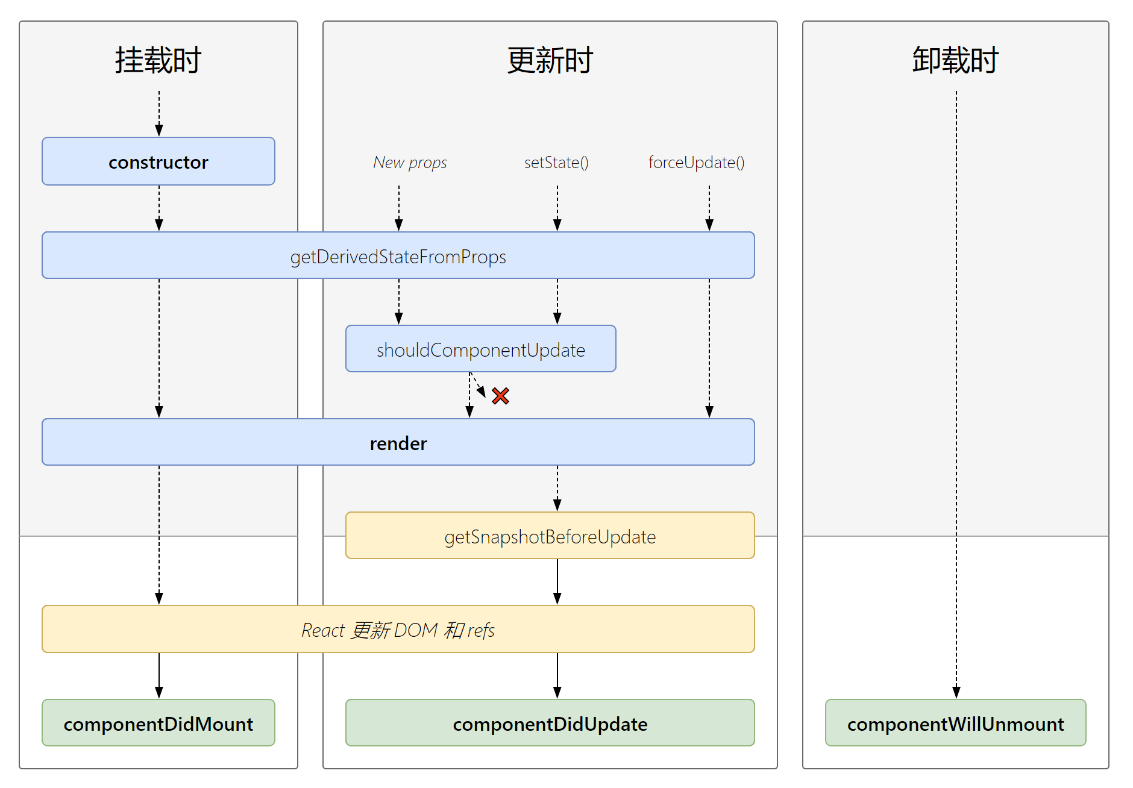
新生命周期
<script type="text/babel">
    //创建组件
    class Count extends React.Component{
        /*
            1. 初始化阶段: 由ReactDOM.render()触发---初次渲染
                            1.	constructor()
                            2.	getDerivedStateFromProps
                            3.	render()
                            4.	componentDidMount() =====> 常用
                                        一般在这个钩子中做一些初始化的事,例如:开启定时器、发送网络请求、订阅消息
            2. 更新阶段: 由组件内部this.setSate()或父组件重新render触发
                            1.	getDerivedStateFromProps
                            2.	shouldComponentUpdate()
                            3.	render()
                            4.	getSnapshotBeforeUpdate
                            5.	componentDidUpdate()
            3. 卸载组件: 由ReactDOM.unmountComponentAtNode()触发
                            1.	componentWillUnmount()  =====> 常用
                                        一般在这个钩子中做一些收尾的事,例如:关闭定时器、取消订阅消息
        */
        //构造器
        constructor(props){
            console.log('Count---constructor');
            super(props)
            //初始化状态
            this.state = {count:0}
        }

        //加1按钮的回调
        add = ()=>{
            //获取原状态
            const {count} = this.state
            //更新状态
            this.setState({count:count+1})
        }

        //卸载组件按钮的回调
        death = ()=>{
            ReactDOM.unmountComponentAtNode(document.getElementById('test'))
        }

        //强制更新按钮的回调
        force = ()=>{
            this.forceUpdate()
        }

        //若state的值在任何时候都取决于props,那么可以使用getDerivedStateFromProps
        static getDerivedStateFromProps(props,state){
            console.log('getDerivedStateFromProps',props,state);
            return null
        }

        //在更新之前获取快照
        getSnapshotBeforeUpdate(){
            console.log('getSnapshotBeforeUpdate');
            return 'atguigu'
        }

        //组件挂载完毕的钩子
        componentDidMount(){
            console.log('Count---componentDidMount');
        }

        //组件将要卸载的钩子
        componentWillUnmount(){
            console.log('Count---componentWillUnmount');
        }

        //控制组件更新的“阀门”
        shouldComponentUpdate(){
            console.log('Count---shouldComponentUpdate');
            return true
        }

        //组件更新完毕的钩子
        componentDidUpdate(preProps,preState,snapshotValue){
            console.log('Count---componentDidUpdate',preProps,preState,snapshotValue);
        }

        render(){
            console.log('Count---render');
            const {count} = this.state
            return(
                <div>
                    <h2>当前求和为:{count}</h2>
                    <button onClick={this.add}>点我+1</button>
                    <button onClick={this.death}>卸载组件</button>
                    <button onClick={this.force}>不更改任何状态中的数据,强制更新一下</button>
                </div>
            )
        }
    }

    //渲染组件
    ReactDOM.render(<Count count={199}/>,document.getElementById('test'))
</script>
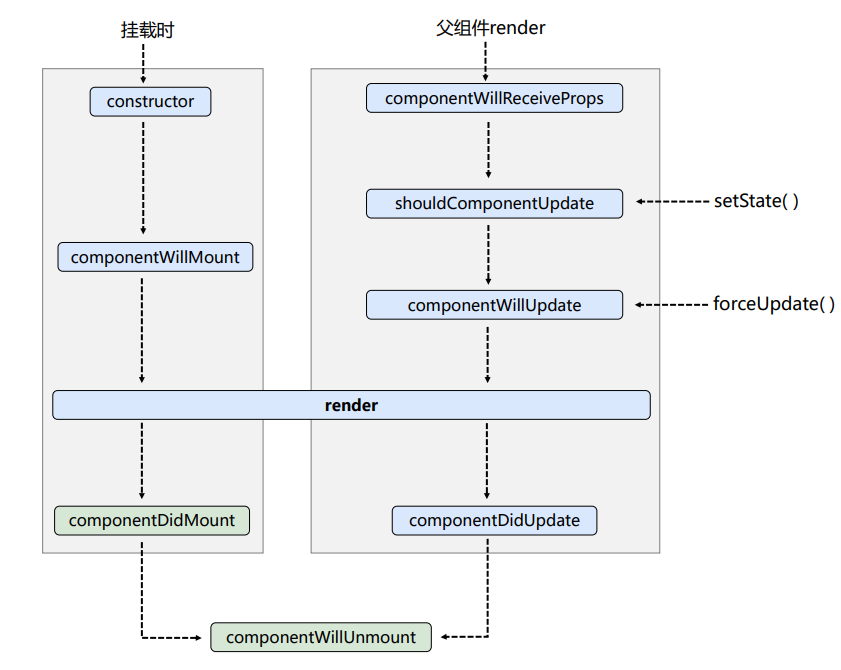
旧生命周期
getSnapshotBeforeUpdate的使用场景
	<script type="text/babel">
		class NewsList extends React.Component{

			state = {newsArr:[]}

			componentDidMount(){
				setInterval(() => {
					//获取原状态
					const {newsArr} = this.state
					//模拟一条新闻
					const news = '新闻'+ (newsArr.length+1)
					//更新状态
					this.setState({newsArr:[news,...newsArr]})
				}, 1000);
			}

			getSnapshotBeforeUpdate(){
				return this.refs.list.scrollHeight
			}

			componentDidUpdate(preProps,preState,height){
				this.refs.list.scrollTop += this.refs.list.scrollHeight - height
			}

			render(){
				return(
					<div className="list" ref="list">
						{
							this.state.newsArr.map((n,index)=>{
								return <div key={index} className="news">{n}</div>
							})
						}
					</div>
				)
			}
		}
		ReactDOM.render(<NewsList/>,document.getElementById('test'))
	</script>
diff算法
<script type="text/babel">
		class Time extends React.Component {
			state = {date: new Date()}

			componentDidMount () {
				setInterval(() => {
					this.setState({
						date: new Date()
					})
				}, 1000)
			}

			render () {
				return (
					<div>
						<h1>hello</h1>
						<input type="text"/>
						<span>
							现在是:{this.state.date.toTimeString()}
							<input type="text"/>
						</span>
					</div>
				)
			}
		}

		ReactDOM.render(<Time/>,document.getElementById('test'))
</script>
diff算法key的作用
<script type="text/babel">
	/*
   经典面试题:
      1). react/vue中的key有什么作用?(key的内部原理是什么?)
      2). 为什么遍历列表时,key最好不要用index?

			1. 虚拟DOM中key的作用:
					1). 简单的说: key是虚拟DOM对象的标识, 在更新显示时key起着极其重要的作用。

					2). 详细的说: 当状态中的数据发生变化时,react会根据【新数据】生成【新的虚拟DOM】,
												随后React进行【新虚拟DOM】与【旧虚拟DOM】的diff比较,比较规则如下:

									a. 旧虚拟DOM中找到了与新虚拟DOM相同的key:
												(1).若虚拟DOM中内容没变, 直接使用之前的真实DOM
												(2).若虚拟DOM中内容变了, 则生成新的真实DOM,随后替换掉页面中之前的真实DOM

									b. 旧虚拟DOM中未找到与新虚拟DOM相同的key
												根据数据创建新的真实DOM,随后渲染到到页面

			2. 用index作为key可能会引发的问题:
								1. 若对数据进行:逆序添加、逆序删除等破坏顺序操作:
												会产生没有必要的真实DOM更新 ==> 界面效果没问题, 但效率低。

								2. 如果结构中还包含输入类的DOM:
												会产生错误DOM更新 ==> 界面有问题。

								3. 注意!如果不存在对数据的逆序添加、逆序删除等破坏顺序操作,
									仅用于渲染列表用于展示,使用index作为key是没有问题的。

			3. 开发中如何选择key?:
								1.最好使用每条数据的唯一标识作为key, 比如id、手机号、身份证号、学号等唯一值。
								2.如果确定只是简单的展示数据,用index也是可以的。
   */

	/*
		慢动作回放----使用index索引值作为key

			初始数据:
					{id:1,name:'小张',age:18},
					{id:2,name:'小李',age:19},
			初始的虚拟DOM:
					<li key=0>小张---18<input type="text"/></li>
					<li key=1>小李---19<input type="text"/></li>

			更新后的数据:
					{id:3,name:'小王',age:20},
					{id:1,name:'小张',age:18},
					{id:2,name:'小李',age:19},
			更新数据后的虚拟DOM:
					<li key=0>小王---20<input type="text"/></li>
					<li key=1>小张---18<input type="text"/></li>
					<li key=2>小李---19<input type="text"/></li>

	-----------------------------------------------------------------

	慢动作回放----使用id唯一标识作为key

			初始数据:
					{id:1,name:'小张',age:18},
					{id:2,name:'小李',age:19},
			初始的虚拟DOM:
					<li key=1>小张---18<input type="text"/></li>
					<li key=2>小李---19<input type="text"/></li>

			更新后的数据:
					{id:3,name:'小王',age:20},
					{id:1,name:'小张',age:18},
					{id:2,name:'小李',age:19},
			更新数据后的虚拟DOM:
					<li key=3>小王---20<input type="text"/></li>
					<li key=1>小张---18<input type="text"/></li>
					<li key=2>小李---19<input type="text"/></li>


	 */
	class Person extends React.Component{

		state = {
			persons:[
				{id:1,name:'小张',age:18},
				{id:2,name:'小李',age:19},
			]
		}

		add = ()=>{
			const {persons} = this.state
			const p = {id:persons.length+1,name:'小王',age:20}
			this.setState({persons:[p,...persons]})
		}

		render(){
			return (
				<div>
					<h2>展示人员信息</h2>
					<button onClick={this.add}>添加一个小王</button>
					<h3>使用index(索引值)作为key</h3>
					<ul>
						{
							this.state.persons.map((personObj,index)=>{
								return <li key={index}>{personObj.name}---{personObj.age}<input type="text"/></li>
							})
						}
					</ul>
					<hr/>
					<hr/>
					<h3>使用id(数据的唯一标识)作为key</h3>
					<ul>
						{
							this.state.persons.map((personObj)=>{
								return <li key={personObj.id}>{personObj.name}---{personObj.age}<input type="text"/></li>
							})
						}
					</ul>
				</div>
			)
		}
	}

	ReactDOM.render(<Person/>,document.getElementById('test'))
</script>