js:字符串;布尔;数字;日期;数组;set;map;闭包;作用域;
String
声明定义
let hd = new String("houdunren");
// 获取字符串长度
console.log(hd.length);
// 获取字符串
console.log(hd.toString());
字符串使用单、双引号包裹,单、双引号使用结果没有区别。
let content = "大人";
console.log(content);
转义符号
有些字符有双层含义,需要使用 \ 转义符号进行含义转换。下例中引号为字符串边界符,如果输出引号时需要使用转义符号。
let content = "大人 'houduren.com'";
console.log(content);
常用转义符号列表如下
| 符号 | 说明 |
|---|---|
| \t | 制表符 |
| \n | 换行 |
| \\ | 斜杠符号 |
| \' | 单引号 |
| \" | 双引号 R |
连接运算符
let year = 2010,
  name = "大人";
console.log(name + "成立于" + year + "年");
使用 += 在字符串上追回字符内容
let web = "大人";
web += "网址:houdunren.com";
console.log(web); //大人网址:houdunren.com
模板字面量
使用 ` ...` 符号包裹的字符串中可以写入引入变量与表达式
let url = "houdunren.com";
console.log(`大人网址是${url}`); //大人网址是houdunren.com
支持换行操作不会产生错误
let url = "houdunren.com";
document.write(`大人网址是${url}
大家可以在网站上学习到很多技术知识`);
使用表达式
function show(title) {
  return `大人`;
}
console.log(`${show()}`);
模板字面量支持嵌套使用
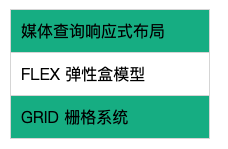
let lessons = [
  { title: "媒体查询响应式布局" },
  { title: "FLEX 弹性盒模型" },
  { title: "GRID 栅格系统" },
];

function template() {
  return `<ul>
      ${lessons
        .map(
          (item) => `
          <li>${item.title}</li>
      `
        )
        .join("")}
  </ul>`;
}
document.body.innerHTML = template();
标签模板
标签模板是提取出普通字符串与变量,交由标签函数处理
let lesson = "css";
let web = "大人";
tag`访问${web}学习${lesson}前端知识`;

function tag(strings, ...values) {
  console.log(strings); //["访问", "学习", "前端知识"]
  console.log(values); // ["大人", "css"]
}
下面例子将标题中有大人的使用标签模板加上链接
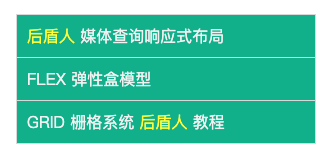
let lessons = [
  { title: "大人媒体查询响应式布局", author: "大人大军" },
  { title: "FLEX 弹性盒模型", author: "大人" },
  { title: "GRID 栅格系统大人教程", author: "古老师" },
];

function links(strings, ...vars) {
  return strings
    .map((str, key) => {
      return (
        str +
        (vars[key]
          ? vars[key].replace(
              "大人",
              `<a href="https://www.houdunren.com">大人</a>`
            )
          : "")
      );
    })
    .join("");
}

function template() {
  return `<ul>
    ${lessons
      .map((item) => links`<li>${item.author}:${item.title}</li>`)
      .join("")}
</ul>`;
}
document.body.innerHTML += template();
获取长度
使用length属性可以获取字符串长度
console.log("houdunren.com".length);
大小写转换
将字符转换成大写格式
console.log("houdunren.com".toUpperCase()); //HOUDUNREN.COM
转字符为小写格式
console.log("houdunren.com".toLowerCase()); //houdunren.com
移除空白
使用trim删除字符串左右的空白字符
let str = "   houdunren.com  ";
console.log(str.length);
console.log(str.trim().length);
使用trimLeft删除左边空白,使用trimRight删除右边空白
let name = " houdunren ";
console.log(name);
console.log(name.trimLeft());
console.log(name.trimRight());
获取单字符
根据从 0 开始的位置获取字符
console.log("houdunren".charAt(3));
使用数字索引获取字符串
console.log("houdunren"[3]);
截取字符串
使用 slice、substr、substring 函数都可以截取字符串。
- slice、substring 第二个参数为截取的结束位置
- substr 第二个参数指定获取字符数量
- substring 会将小的作为起始位置负数自动转成 0
let hd = "houdunren.com";
console.log(hd.slice(3)); //dunren.com
console.log(hd.substr(3)); //dunren.com
console.log(hd.substring(3)); //dunren.com

console.log(hd.slice(3, 6)); //dun
console.log(hd.substring(3, 6)); //dun
console.log(hd.substring(3, 0)); //hou 较小的做为起始位置
console.log(hd.substr(3, 6)); //dunren

console.log(hd.slice(3, -1)); //dunren.co 第二个为负数表示从后面算的字符
console.log(hd.slice(-2)); //om 从末尾取
console.log(hd.substring(3, -9)); //hou 负数转为0
console.log(hd.substr(-3, 2)); //co 从后面第三个开始取两个
查找字符串
从开始获取字符串位置,检测不到时返回 -1
console.log("houdunren.com".indexOf("o")); //1
console.log("houdunren.com".indexOf("o", 3)); //11 从第3个字符向后搜索
从结尾来搜索字符串位置
console.log("houdunren.com".lastIndexOf("o")); //11
console.log("houdunren.com".lastIndexOf("o", 7)); //1 从第7个字符向前搜索
search() 方法用于检索字符串中指定的子字符串,也可以使用正则表达式搜索
let str = "houdunren.com";
console.log(str.search("com")); // 10
console.log(str.search(/\.com/i)); // 9
includes 字符串中是否包含指定的值,第二个参数指查找开始位置
console.log("houdunren.com".includes("o")); //true
console.log("houdunren.com".includes("h", 11)); //true
startsWith 是否是指定位置开始,第二个参数为查找的开始位置。
console.log("houdunren.com".startsWith("h")); //true
console.log("houdunren.com".startsWith("o", 1)); //true
endsWith 是否是指定位置结束,第二个参数为查找的结束位置。
console.log("houdunren.com".endsWith("com")); //true
console.log("houdunren.com".endsWith("o", 2)); //true
下面是查找关键词的示例
const words = ["php", "css"];
const title = "我爱在大人学习php与css知识";
const status = words.some((word) => {
  return title.includes(word);
});
console.log(status);
替换字符串
replace 方法用于字符串的替换操作
let name = "houdunren.com";
web = name.replace("houdunren", "hdcms");
console.log(web);
默认只替换一次,如果全局替换需要使用正则(更强大的使用会在正则表达式章节介绍)
let str = "2023/02/12";
console.log(str.replace(/\//g, "-"));
使用字符串替换来生成关键词链接
const word = ["php", "css"];
const string = "我喜欢在大人学习php与css知识";
const title = word.reduce((pre, word) => {
  return pre.replace(word, `<a href="?w=${word}">${word}</a>`);
}, string);
document.body.innerHTML += title;
使用正则表达式完成替换
let res = "houdunren.com".replace(/u/g, (str) => {
  return "@";
});
console.log(res);
重复生成
下例是根据参数重复生成星号
function star(num = 3) {
  return "*".repeat(num);
}
console.log(star());
下面是模糊后三位电话号码
let phone = "98765432101";
console.log(phone.slice(0, -3) + "*".repeat(3));
类型转换-分隔字母
let name = "hdcms";
console.log(name.split(""));
将字符串转换为数组
console.log("1,2,3".split(",")); //[1,2,3]
隐式类型转换会根据类型自动转换类型
let hd = 99 + "";
console.log(typeof hd); //string
使用 String 构造函数可以显示转换字符串类型
let hd = 99;
console.log(typeof String(hd)); //如果是直接 99.toString()会报错
js 中大部分类型都是对象,可以使用类方法 toString转化为字符串
let hd = 99;
console.log(typeof hd.toString()); //string

let arr = ["hdcms", "大人"];
console.log(typeof arr.toString()); //string
Boolean
布尔类型包括 true 与 false 两个值,开发中使用较多的数据类型。
声明定义
使用对象形式创建布尔类型
console.log(new Boolean(true)); //true
console.log(new Boolean(false)); //false
但建议使用字面量创建布尔类型
let hd = true;
隐式转换
基本上所有类型都可以隐式转换为 Boolean 类型。
| 数据类型 | true | false |
|---|---|---|
| String | 非空字符串 | 空字符串 |
| Number | 非 0 的数值 | 0 、NaN |
| Array | 数组不参与比较时 | 参与比较的空数组 |
| Object | 所有对象 | |
| undefined | 无 | undefined |
| null | 无 | null |
| NaN | 无 | NaN |
当与 boolean 类型比较时,会将两边类型统一为数字 1 或 0。
如果使用 Boolean 与数值比较时,会进行隐式类型转换 true 转为 1,false 转为 0。
console.log(3 == true); //false
console.log(0 == false); //true
下面是一个典型的例子,字符串在与 Boolean 比较时,两边都为转换为数值类型后再进行比较。
console.log(Number("houdunren")); //NaN
console.log(Boolean("houdunren")); //true
console.log("houdunren" == true); //false
console.log("1" == true); //true
数组的表现与字符串原理一样,会先转换为数值
console.log(Number([])); //0
console.log(Number([3])); //3
console.log(Number([1, 2, 3])); //NaN
console.log([] == false); //true
console.log([1] == true); //true
console.log([1, 2, 3] == true); //false
引用类型的 Boolean 值为真,如对象和数组
if ([]) console.log("true");
if ({}) console.log("true");
显式转换
使用 !! 转换布尔类型
let hd = "";
console.log(!!hd); //false
hd = 0;
console.log(!!hd); //false
hd = null;
console.log(!!hd); //false
hd = new Date("2020-2-22 10:33");
console.log(!!hd); //true
使用 Boolean 函数可以显式转换为布尔类型
let hd = "";
console.log(Boolean(hd)); //false
hd = 0;
console.log(Boolean(hd)); //false
hd = null;
console.log(Boolean(hd)); //false
hd = new Date("2020-2-22 10:33");
console.log(Boolean(hd)); //true
实例操作
下面使用 Boolean 类型判断用户的输入,并给出不同的反馈。
while (true) {
  let n = prompt("请输入大人成立年份").trim();
  if (!n) continue;
  alert(n == 2010 ? "回答正确" : "答案错误!看看官网了解下");
  break;
}
Number
声明定义
使用对象方式声明
let hd = new Number(3);
console.log(hd + 3); //6
Number 用于表示整数和浮点数,数字是 Number实例化的对象,可以使用对象提供的丰富方法。
let num = 99;
console.log(typeof num);
基本函数
判断是否为整数
console.log(Number.isInteger(1.2)); //false
指定返回的小数位数可以四舍五入
console.log((16.556).toFixed(2)); // 16.56
NaN
表示无效的数值,下例计算将产生 NaN 结果。
console.log(Number("houdunren")); //NaN
console.log(2 / "houdunren"); //NaN
NaN 不能使用 == 比较,使用以下代码来判断结果是否正确 Number.isNaN
var res = 2 / "houdunren";
if (Number.isNaN(res)) {
  console.log("Error");
}
也可以使用 Object.is 方法判断两个值是否完全相同
var res = 2 / "houdunren";
console.log(Object.is(res, NaN)); //true
类型转换
Number
使用 Number 函数基本上可以转换所有类型
console.log(Number("houdunren")); //NaN
console.log(Number(true)); //1
console.log(Number(false)); //0
console.log(Number("9")); //9
console.log(Number([])); //0
console.log(Number([5])); //5
console.log(Number([5, 2])); //NaN
console.log(Number({})); //NaN
parseInt
提取字符串开始去除空白后的数字转为整数。
console.log(parseInt("  99houdunren")); //99
console.log(parseInt("18.55")); //18
parseFloat
转换字符串为浮点数,忽略字符串前面空白字符。
console.log(parseFloat("  99houdunren")); //99
console.log(parseFloat("18.55")); //18.55
比如从表单获取的数字是字符串类型需要类型转换才可以计算,下面使用乘法进行隐式类型转换。
<input type="text" name="num" value="66">
<script>
  let num = document.querySelector("[name='num']").value;
  console.log(num + 5); //665
  console.log(num * 1 + 5); //71
</script>
舍入操作
使用 toFixed 可对数值舍入操作,参数指定保存的小数位
console.log((1.556).toFixed(2)); //1.56
浮点精度
大部分编程语言在浮点数计算时都会有精度误差问题,下面来看 JS 中的表现形式
let hd = 0.1 + 0.2;
console.log(hd); // 结果:0.30000000000000004
这是因为计算机以二进制处理数值类型,上面的 0.1 与 0.2 转为二进制后是无穷的
console.log((0.1).toString(2)); //0.0001100110011001100110011001100110011001100110011001101
console.log((0.2).toString(2)); //0.001100110011001100110011001100110011001100110011001101
处理方式
一种方式使用 toFixed 方法进行小数截取
console.log((0.1 + 0.2).toFixed(2)); //0.3
console.log(1.0 - 0.9); //0.09999999999999998
console.log((1.0 - 0.9).toFixed(2)); //0.10
将小数转为整数进行计算后,再转为小数也可以解决精度问题
Number.prototype.add = function (num) {
  //取两个数值中小数位最大的
  let n1 = this.toString().split(".")[1].length;
  let n2 = num.toString().split(".")[1].length;

  //得到10的N次幂
  let m = Math.pow(10, Math.max(n1, n2));

  return (this * m + num * m) / m;
};
console.log((0.1).add(0.2));
推荐做法
市面上已经存在很多针对数学计算的库 mathjs (opens new window)、decimal.js (opens new window)等,我们就不需要自己构建了。下面来演示使用 decimal.js (opens new window)进行浮点计算。
<script src="https://cdn.bootcss.com/decimal.js/10.2.0/decimal.min.js"></script>
<script>
    console.log(Decimal.add(0.1, 0.2).valueOf())
</script>
Math
Math 对象提供了众多方法用来进行数学计算,下面我们介绍常用的方法,更多方法使用请查看 MDN 官网 (opens new window)了解。
取极限值
使用 min 与 max 可以取得最小与最大值。
console.log(Math.min(1, 2, 3)); //1
console.log(Math.max(1, 2, 3)); //3
使用apply 来从数组中取值
console.log(Math.max.apply(Math, [1, 2, 3])); //3
舍入处理
取最接近的向上整数
console.log(Math.ceil(1.111)); //2
得到最接近的向下整数
console.log(Math.floor(1.555)); //1
四舍五入处理
console.log(Math.round(1.5)); //2
random
random 方法用于返回 >=0 且 <1 的随机数(包括 0 但不包括 1)。
返回 0~5 的随机数,不包括 5
const number = Math.floor(Math.random() * 5);
console.log(number);
返回 0~5 的随机数,包括 5
const number = Math.floor(Math.random() * (5 + 1));
console.log(number);
下面取 2~5 的随机数(不包括 5)公式为:min+Math.floor(Math.random()*(Max-min))
const number = Math.floor(Math.random() * (5 - 2)) + 2;
console.log(number);
下面取 2~5 的随机数(包括 5)公式为:min+Math.floor(Math.random()*(Max-min+1))
const number = Math.floor(Math.random() * (5 - 2 + 1)) + 2;
console.log(number);
下面是随机点名的示例
let stus = ["小明", "张三", "王五", "爱情"];
let pos = Math.floor(Math.random() * stus.length);
console.log(stus[pos]);
随机取第二到第三间的学生,即 1~2 的值
let stus = ["小明", "张三", "王五", "爱情"];
let pos = Math.floor(Math.random() * (3 - 1)) + 1;
console.log(stus[pos]);
Date
网站中处理日期时间是很常用的功能,通过 Date 类型提供的丰富功能可以非常方便的操作。
声明日期
获取当前日期时间
let now = new Date();
console.log(now); //"Sun Jul 10 2022 11:12:46 GMT+0800 (中国标准时间)"
console.log(typeof now); //object
console.log(now * 1); //获取时间戳毫秒 1657422766355

//直接使用函数获取当前时间
console.log(Date()); //Sun Jul 10 2022 11:14:08 GMT+0800 (中国标准时间)
console.log(typeof Date()); //string

//获取当前时间戳单位毫秒
console.log(Date.now()); //1657422873701
计算脚本执行时间
const start = Date.now();
for (let i = 0; i < 2000000; i++) {}
const end = Date.now();
console.log(end - start);
当然也可以使用控制台测试
console.time("testFor");
for (let i = 0; i < 20000000; i++) {}
console.timeEnd("testFor");
根据指定的日期与时间定义日期对象
let now = new Date("2028-02-22 03:25:02");
console.log(now); //Tue Feb 22 2028 03:25:02 GMT+0800 (中国标准时间)

now = new Date(2028, 4, 5, 1, 22, 16);
console.log(now); //Fri May 05 2028 01:22:16 GMT+0800 (中国标准时间)
使用展示运算符处理更方便
let info = [2020, 2, 20, 10, 15, 32];
let date = new Date(...info);
console.dir(date); //Fri Mar 20 2020 10:15:32 GMT+0800 (中国标准时间)
类型转换
将日期转为数值类型就是转为时间戳单位是毫秒
let hd = new Date("2020-2-22 10:33:12");
console.log(hd * 1); //1582338792000

console.log(Number(hd)); //1582338792000

console.log(hd.valueOf()); //1582338792000

console.log(hd.getTime()); //1582338792000
有时后台提供的日期为时间戳格式,下面是将时间戳转换为标准日期的方法
const param = [1990, 2, 22, 13, 22, 19];
const date = new Date(...param);
const timestamp = date.getTime();
console.log(timestamp); //638083339000
console.log(new Date(timestamp)); //Thu Mar 22 1990 13:22:19 GMT+0800 (中国标准时间)
对象方法
格式化输出日期
let time = new Date();
console.log(
  `${time.getFullYear()}-${time.getMonth()}-${time.getDate()} ${time.getHours()}:${time.getMinutes()}:${time.getSeconds()}`
);
//2022-6-10 11:18:54
封装函数用于复用
function dateFormat(date, format = "YYYY-MM-DD HH:mm:ss") {
  const config = {
    YYYY: date.getFullYear(),
    MM: date.getMonth() + 1,
    DD: date.getDate(),
    HH: date.getHours(),
    mm: date.getMinutes(),
    ss: date.getSeconds(),
  };
  for (const key in config) {
    format = format.replace(key, config[key]);
  }
  return format;
}
console.log(dateFormat(new Date(), "YYYY年MM月DD日"));
下面是系统提供的日期时间方法,更多方法请查看 MDN 官网(opens new window)
| 方法 | 描述 |
|---|---|
| Date() | 返回当日的日期和时间。 |
| getDate() | 从 Date 对象返回一个月中的某一天 (1 ~ 31)。 |
| getDay() | 从 Date 对象返回一周中的某一天 (0 ~ 6)。 |
| getMonth() | 从 Date 对象返回月份 (0 ~ 11)。 |
| getFullYear() | 从 Date 对象以四位数字返回年份。 |
| getYear() | 请使用 getFullYear() 方法代替。 |
| getHours() | 返回 Date 对象的小时 (0 ~ 23)。 |
| getMinutes() | 返回 Date 对象的分钟 (0 ~ 59)。 |
| getSeconds() | 返回 Date 对象的秒数 (0 ~ 59)。 |
| getMilliseconds() | 返回 Date 对象的毫秒(0 ~ 999)。 |
| getTime() | 返回 1970 年 1 月 1 日至今的毫秒数。 |
| getTimezoneOffset() | 返回本地时间与格林威治标准时间 (GMT) 的分钟差。 |
| getUTCDate() | 根据世界时从 Date 对象返回月中的一天 (1 ~ 31)。 |
| getUTCDay() | 根据世界时从 Date 对象返回周中的一天 (0 ~ 6)。 |
| getUTCMonth() | 根据世界时从 Date 对象返回月份 (0 ~ 11)。 |
| getUTCFullYear() | 根据世界时从 Date 对象返回四位数的年份。 |
| getUTCHours() | 根据世界时返回 Date 对象的小时 (0 ~ 23)。 |
| getUTCMinutes() | 根据世界时返回 Date 对象的分钟 (0 ~ 59)。 |
| getUTCSeconds() | 根据世界时返回 Date 对象的秒钟 (0 ~ 59)。 |
| getUTCMilliseconds() | 根据世界时返回 Date 对象的毫秒(0 ~ 999)。 |
| parse() | 返回 1970 年 1 月 1 日午夜到指定日期(字符串)的毫秒数。 |
| setDate() | 设置 Date 对象中月的某一天 (1 ~ 31)。 |
| setMonth() | 设置 Date 对象中月份 (0 ~ 11)。 |
| setFullYear() | 设置 Date 对象中的年份(四位数字)。 |
| setYear() | 请使用 setFullYear() 方法代替。 |
| setHours() | 设置 Date 对象中的小时 (0 ~ 23)。 |
| setMinutes() | 设置 Date 对象中的分钟 (0 ~ 59)。 |
| setSeconds() | 设置 Date 对象中的秒钟 (0 ~ 59)。 |
| setMilliseconds() | 设置 Date 对象中的毫秒 (0 ~ 999)。 |
| setTime() | 以毫秒设置 Date 对象。 |
| setUTCDate() | 根据世界时设置 Date 对象中月份的一天 (1 ~ 31)。 |
| setUTCMonth() | 根据世界时设置 Date 对象中的月份 (0 ~ 11)。 |
| setUTCFullYear() | 根据世界时设置 Date 对象中的年份(四位数字)。 |
| setUTCHours() | 根据世界时设置 Date 对象中的小时 (0 ~ 23)。 |
| setUTCMinutes() | 根据世界时设置 Date 对象中的分钟 (0 ~ 59)。 |
| setUTCSeconds() | 根据世界时设置 Date 对象中的秒钟 (0 ~ 59)。 |
| setUTCMilliseconds() | 根据世界时设置 Date 对象中的毫秒 (0 ~ 999)。 |
| toSource() | 返回该对象的源代码。 |
| toString() | 把 Date 对象转换为字符串。 |
| toTimeString() | 把 Date 对象的时间部分转换为字符串。 |
| toDateString() | 把 Date 对象的日期部分转换为字符串。 |
| toGMTString() | 请使用 toUTCString() 方法代替。 |
| toUTCString() | 根据世界时,把 Date 对象转换为字符串。 |
| toLocaleString() | 根据本地时间格式,把 Date 对象转换为字符串。 |
| toLocaleTimeString() | 根据本地时间格式,把 Date 对象的时间部分转换为字符串。 |
| toLocaleDateString() | 根据本地时间格式,把 Date 对象的日期部分转换为字符串。 |
| UTC() | 根据世界时返回 1970 年 1 月 1 日 到指定日期的毫秒数。 |
| valueOf() | 返回 Date 对象的原始值。 |
moment.js
Moment.js 是一个轻量级的 JavaScript 时间库,它方便了日常开发中对时间的操作,提高了开发效率。
更多使用方法请访问中文官网 http://momentjs.cn (opens new window)或 英文官网 https://momentjs.com(opens new window)
<script src="https://cdn.bootcss.com/moment.js/2.24.0/moment.min.js"></script>
获取当前时间
console.log(moment().format("YYYY-MM-DD HH:mm:ss"));
设置时间
console.log(moment("2020-02-18 09:22:15").format("YYYY-MM-DD HH:mm:ss"));
十天后的日期
console.log(moment().add(10, "days").format("YYYY-MM-DD hh:mm:ss"));
声明数组
数组是多个变量值的集合,数组是Array 对象的实例,所以可以像对象一样调用方法。
创建数组
使用对象方式创建数组
console.log(new Array(1, "大人", "hdcms")); //[1, "大人", "hdcms"]
使用字面量创建是推荐的简单作法
const array = ["hdcms", "houdunren"];
多维数组定义
const array = [["hdcms"], ["houdunren"]];
console.log(array[1][0]); //houdunren
数组是引用类型可以使用const声明并修改它的值
const array = ["hdcms", "houdunren"];
array.push("houdunwang");
console.log(array); // ['hdcms', 'houdunren', 'houdunwang']
使用原型的 length属性可以获取数组元素数量
let hd = ["大人", "hdcms"];
console.log(hd.length); //2
数组可以设置任何值,下面是使用索引添加数组
let hd = ["大人"];
hd[1] = "hdcms";
下面直接设置 3 号数组,会将 1/2 索引的数组定义为空值
let hd = ["大人"];
hd[3] = "hdcms";
console.log(hd.length); //4
声明多个空元素的数组
let hd = new Array(3);
console.log(hd.length); //3
console.log(hd); //[空属性 × 3]
Array.of
使用Array.of 与 new Array 不同是设置一个参数时不会创建空元素数组
let hd = Array.of(3);
console.log(hd); //[3]

hd = Array.of(1, 2, 3);
console.log(hd); //[1, 2, 3]
类型检测
检测变量是否为数组类型
console.log(Array.isArray([1, "大人", "hdcms"])); //true
console.log(Array.isArray(9)); //false
类型转换
可以将数组转换为字符串也可以将其他类型转换为数组。
字符串
大部分数据类型都可以使用.toString() 函数转换为字符串。
console.log([1, 2, 3].toString()); // 1,2,3
也可以使用函数 String 转换为字符串。
console.log(String([1, 2, 3])); //1,2,3
或使用join连接为字符串
console.log([1, 2, 3].join("-")); //1-2-3
Array.from
使用Array.from可将类数组转换为数组,类数组指包含 length 属性或可迭代的对象。
- 第一个参数为要转换的数据,第二个参数为类似于
map函数的回调方法
let str = "大人";
console.log(Array.from(str)); //["后", "盾", "人"]
为对象设置length属性后也可以转换为数组,但要下标为数值或数值字符串
let user = {
  0: "大人",
  1: 18,
  length: 2,
};
console.log(Array.from(user)); //["大人", 18]
DOM 元素转换为数组后来使用数组函数,第二个参数类似于map 函数的方法,可对数组元素执行函数处理。
<body>
    <button message="大人">button</button>
    <button message="hdcms">button</button>
</body>

<script>
    let btns = document.querySelectorAll('button');
    console.log(btns); //包含length属性
    Array.from(btns, (item) => {
        item.style.background = 'red';
    });
</script>
展开语法
使用展开语法将 NodeList 转换为数组操作
<style>
    .hide {
      display: none;
    }
</style>

<body>
  <div>hdcms</div>
  <div>houdunren</div>
</body>

<script>
  let divs = document.querySelectorAll("div");
  [...divs].map(function(div) {
    div.addEventListener("click", function() {
      this.classList.toggle("hide");
    });
  });
</script>
展开语法
数组合并
使用展开语法来合并数组相比 concat 要更简单,使用... 可将数组展开为多个值。
let a = [1, 2, 3];
let b = ["a", "大人", ...a];
console.log(b); //["a", "大人", 1, 2, 3]
函数参数
使用展示语法可以替代 arguments 来接收任意数量的参数
function hd(...args) {
  console.log(args);
}
hd(1, 2, 3, "大人"); //[1, 2, 3, "大人"]
也可以用于接收部分参数
function hd(site, ...args) {
  console.log(site, args); //大人 (3) [1, 2, 3]
}
hd("大人", 1, 2, 3);
节点转换
可以将 DOM 节点转为数组,下面例子不可以使用 filter 因为是节点列表
<body>
    <button message="大人">button</button>
    <button message="hdcms">button</button>
</body>

<script>
    let btns = document.querySelectorAll('button');
    btns.map((item) => {
        console.log(item); //TypeError: btns.filter is not a function
    })
</script>
使用展开语法后就可以使用数据方法
<body>
  <div>hdcms</div>
  <div>houdunren</div>
</body>

<script>
  let divs = document.querySelectorAll("div");
  [...divs].map(function(div) {
    div.addEventListener("click", function() {
      this.classList.toggle("hide");
    });
  });
</script>
学习后面章节后也可以使用原型处理
<body>
    <button message="大人">button</button>
    <button message="hdcms">button</button>
</body>

<script>
    let btns = document.querySelectorAll('button');
    Array.prototype.map.call(btns, (item) => {
        item.style.background = 'red';
    });
</script>
解构赋值
解构是一种更简洁的赋值特性,可以理解为分解一个数据的结构
- 建设使用
var/let/const声明
基本使用
下面是基本使用语法
//数组使用
let [name, url] = ["大人", "houdunren.com"];
console.log(name);
解构赋值数组
function hd() {
  return ["houdunren", "hdcms"];
}
let [a, b] = hd();
console.log(a); //houdunren
剩余解构指用一个变量来接收剩余参数
let [a, ...b] = ["大人", "houdunren", "hdcms"];
console.log(b); //['houdunren', 'hdcms']
如果变量已经初始化过,就要使用() 定义赋值表达式,严格模式会报错所以不建议使用。
let web = "大人";
[web, url] = ["hdcms.com", "houdunren.com"];
console.log(web); //hdcms.com
字符串解构
"use strict";
const [...a] = "houdunren.com";
console.log(a); //Array(13)
严格模式
非严格模式可以不使用声明指令,严格模式下必须使用声明。所以建议使用 let 等声明。
"use strict";

[web, url] = ["hdcms.com", "houdunren.com"];
console.log(web);
简洁定义
只赋值部分变量
let [, url] = ["大人", "houdunren.com"];
console.log(url); //houdunren.com
使用展开语法获取多个值
let [name, ...arr] = ["大人", "hdcms", "houdunren.com"];
console.log(name, arr); //大人 (2) ["hdcms", "houdunren.com"]
默认值
为变量设置默认值
let [name, site = "hdcms"] = ["大人"];
console.log(site); //hdcms
函数参数
数组参数的使用
function hd([a, b]) {
  console.log(a, b);
}
hd(["大人", "hdcms"]);
管理元素
基本使用
使用从 0 开始的索引来改变数组
let arr = [1, "大人", "hdcms"];
arr[1] = "大人教程";
console.log(arr); //[1, "大人教程", "hdcms"]
向数组追回元素
let arr = [1, "大人", "hdcms"];
arr[arr.length] = "houdunren.com";
console.log(arr); //[1, "大人", "hdcms", "houdunren.com"]
扩展语法
使用展示语法批量添加元素
let arr = ["大人", "hdcms"];
let hd = ["houdunren"];
hd.push(...arr);
console.log(hd); //["houdunren", "大人", "hdcms"]
push
压入元素,直接改变元数组,返回值为数组元素数量
let arr = ["大人", "hdcms"];
console.log(arr.push("大军大叔", "houdunren ")); //4
console.log(arr); //["大人", "hdcms", "大军大叔", "houdunren"]
根据区间创建新数组
function rangeArray(begin, end) {
  const array = [];
  for (let i = begin; i <= end; i++) {
    array.push(i);
  }
  return array;
}
console.log(rangeArray(1, 6));
pop
从末尾弹出元素,直接改变元数组,返回值为弹出的元素
let arr = ["大人", "hdcms"];
console.log(arr.pop()); //hdcms
console.log(arr); //["大人"]
shift
从数组前面取出一个元素
let arr = ["大人", "hdcms"];
console.log(arr.shift()); //大人
console.log(arr); //["hdcms"]
unshift
从数组前面添加元素
let arr = ["大人", "hdcms"];
console.log(arr.unshift("大军大叔", "houdunren")); //4
console.log(arr); //["大军大叔", "houdunren", "大人", "hdcms"]
fill
使用fill 填充数组元素
console.dir(Array(4).fill("大人")); //["大人", "大人", "大人", "大人"]
指定填充位置
console.log([1, 2, 3, 4].fill("大人", 1, 2)); //[1, "大人", 3, 4] fill(vlue start end)
slice
使用 slice 方法从数组中截取部分元素组合成新数组(并不会改变原数组),不传第二个参数时截取到数组的最后元素。
let arr = [0, 1, 2, 3, 4, 5, 6];
console.log(arr.slice(1, 3)); // [1,2]
不设置参数是为获取所有元素
let arr = [0, 1, 2, 3, 4, 5, 6];
console.log(arr.slice()); //[0, 1, 2, 3, 4, 5, 6]
splice
使用 splice 方法可以添加、删除、替换数组中的元素,会对原数组进行改变,返回值为删除的元素。
删除数组元素第一个参数为从哪开始删除,第二个参数为删除的数量。
let arr = [0, 1, 2, 3, 4, 5, 6];
console.log(arr.splice(1, 3)); //返回删除的元素 [1, 2, 3]
console.log(arr); //删除数据后的原数组 [0, 4, 5, 6]
通过修改length删除最后一个元素
let arr = ["大人", "hdcms"];
arr.length = arr.length - 1;
console.log(arr);
通过指定第三个参数来设置在删除位置添加的元素
let arr = [0, 1, 2, 3, 4, 5, 6];
console.log(arr.splice(1, 3, "hdcms", "大人")); //[1, 2, 3]
console.log(arr); //[0, "hdcms", "大人", 4, 5, 6]
向末尾添加元素
let arr = [0, 1, 2, 3, 4, 5, 6];
console.log(arr.splice(arr.length, 0, "hdcms", "大人")); //[]
console.log(arr); // [0, 1, 2, 3, 4, 5, 6, "hdcms", "大人"]
向数组前添加元素
let arr = [0, 1, 2, 3, 4, 5, 6];
console.log(arr.splice(0, 0, "hdcms", "大人")); //[]
console.log(arr); //["hdcms", "大人", 0, 1, 2, 3, 4, 5, 6]
数组元素位置调整函数
function move(array, before, to) {
  if (before < 0 || to >= array.length) {
    console.error("指定位置错误");
    return;
  }
  const newArray = [...array];
  const elem = newArray.splice(before, 1);
  newArray.splice(to, 0, ...elem);
  return newArray;
}
const array = [1, 2, 3, 4];
console.table(move(array, 0, 3));
清空数组
将数组值修改为[]可以清空数组,如果有多个引用时数组在内存中存在被其他变量引用。
let user = [{ name: "hdcms" }, { name: "大人" }];
let cms = user;
user = [];
console.log(user);
console.log(cms);
将数组length设置为 0 也可以清空数组
let user = [{ name: "hdcms" }, { name: "大人" }];
user.length = 0;
console.log(user);
使用splice方法删除所有数组元素
let user = [{ name: "hdcms" }, { name: "大人" }];
user.splice(0, user.length);
console.log(user);
使用pop/shift删除所有元素,来清空数组
let user = [{ name: "hdcms" }, { name: "大人" }];
while (user.pop()) {}
console.log(user);
合并拆分
join
使用join连接成字符串
let arr = [1, "大人", "hdcms"];
console.log(arr.join("-")); //1-大人-hdcms 使用join可以指定转换的连接方式
split
split 方法用于将字符串分割成数组,类似join方法的反函数。
let price = "99,78,68";
console.log(price.split(",")); //["99", "78", "68"]
concat
concat方法用于连接两个或多个数组,元素是值类型的是复制操作,如果是引用类型还是指向同一对象
let array = ["hdcms", "houdunren"];
let hd = [1, 2];
let cms = [3, 4];
console.log(array.concat(hd, cms)); //["hdcms", "houdunren", 1, 2, 3, 4]
也可以使用扩展语法实现连接
console.log([...array, ...hd, ...cms]);
copyWithin
使用 copyWithin 从数组中复制一部分到同数组中的另外位置。
语法说明
array.copyWithin(target, start, end);
参数说明
| 参数 | 描述 |
|---|---|
| target | 必需。复制到指定目标索引位置。 |
| start | 可选。元素复制的起始位置。 |
| end | 可选。停止复制的索引位置 (默认为 array.length)。如果为负值,表示倒数。 |
const arr = [1, 2, 3, 4];
console.log(arr.copyWithin(2, 0, 2)); //[1, 2, 1, 2]
查找元素
数组包含多种查找的函数,需要把这些函数掌握清楚,然后根据不同场景选择合适的函数。
indexOf
使用 indexOf 从前向后查找元素出现的位置,如果找不到返回 -1。
let arr = [7, 3, 2, 8, 2, 6];
console.log(arr.indexOf(2)); // 2 从前面查找2出现的位置
如下面代码一下,使用 indexOf 查找字符串将找不到,因为indexOf 类似于===是严格类型约束。
let arr = [7, 3, 2, "8", 2, 6];
console.log(arr.indexOf(8)); // -1
第二个参数用于指定查找开始位置
let arr = [7, 3, 2, 8, 2, 6];
//从第二个元素开始向后查找
console.log(arr.indexOf(2, 3)); //4
lastIndexOf
使用 lastIndexOf 从后向前查找元素出现的位置,如果找不到返回 -1。
let arr = [7, 3, 2, 8, 2, 6];
console.log(arr.lastIndexOf(2)); // 4 从后查找2出现的位置
第二个参数用于指定查找开始位置
let arr = [7, 3, 2, 8, 2, 6];
//从第五个元素向前查找
console.log(arr.lastIndexOf(2, 5));

//从最后一个字符向前查找
console.log(arr.lastIndexOf(2, -2));
includes
使用 includes 查找字符串返回值是布尔类型更方便判断
let arr = [7, 3, 2, 6];
console.log(arr.includes(6)); //true
我们来实现一个自已经的includes函数,来加深对includes方法的了解
function includes(array, item) {
  for (const value of array) if (item === value) return true;
  return false;
}

console.log(includes([1, 2, 3, 4], 3)); //true
find
find 方法找到后会把值返回出来
- 如果找不到返回值为
undefined
返回第一次找到的值,不继续查找
let arr = ["hdcms", "houdunren", "hdcms"];

let find = arr.find(function (item) {
  return item == "hdcms";
});

console.log(find); //hdcms
使用includes等不能查找引用类型,因为它们的内存地址是不相等的
const user = [{ name: "李四" }, { name: "张三" }, { name: "大人" }];
const find = user.includes({ name: "大人" });
console.log(find);
find 可以方便的查找引用类型
const user = [{ name: "李四" }, { name: "张三" }, { name: "大人" }];
const find = user.find((user) => (user.name = "大人"));
console.log(find);
findIndex
findIndex 与 find 的区别是返回索引值,参数也是 : 当前值,索引,操作数组。
- 查找不到时返回
-1
let arr = [7, 3, 2, "8", 2, 6];

console.log(
  arr.findIndex(function (v) {
    return v == 8;
  })
); //3
find 原理
下面使用自定义函数
let arr = [1, 2, 3, 4, 5];
function find(array, callback) {
  for (const value of array) {
    if (callback(value) === true) return value;
  }
  return undefined;
}
let res = find(arr, function (item) {
  return item == 23;
});
console.log(res);
下面添加原型方法实现
Array.prototype.findValue = function (callback) {
  for (const value of this) {
    if (callback(value) === true) return value;
  }
  return undefined;
};

let re = arr.findValue(function (item) {
  return item == 2;
});
console.log(re);
数组排序
reverse
反转数组顺序
let arr = [1, 4, 2, 9];
console.log(arr.reverse()); //[9, 2, 4, 1]
sort
sort每次使用两个值进行比较 Array.sort((a,b)=>a-b
- 返回负数 a 排在 b 前面,从小到大
- 返回正数 b 排在 a 前面
- 返回 0 时不动
默认从小于大排序数组元素
let arr = [1, 4, 2, 9];
console.log(arr.sort()); //[1, 2, 4, 9]
使用排序函数从大到小排序,参数一与参数二比较,返回正数为降序负数为升序
let arr = [1, 4, 2, 9];

console.log(
  arr.sort(function (v1, v2) {
    return v2 - v1;
  })
); //[9, 4, 2, 1]
下面是按课程点击数由高到低排序
let lessons = [
  { title: "媒体查询响应式布局", click: 78 },
  { title: "FLEX 弹性盒模型", click: 12 },
  { title: "MYSQL多表查询随意操作", click: 99 },
];

let sortLessons = lessons.sort((v1, v2) => v2.click - v1.click);
console.log(sortLessons);
排序原理
let arr = [1, 5, 3, 9, 7];
function sort(array, callback) {
  for (const n in array) {
    for (const m in array) {
      if (callback(array[n], array[m]) < 0) {
        let temp = array[n];
        array[n] = array[m];
        array[m] = temp;
      }
    }
  }
  return array;
}
arr = sort(arr, function (a, b) {
  return a - b;
});
console.table(arr);
循环遍历
for
根据数组长度结合for 循环来遍历数组
let lessons = [
  { title: "媒体查询响应式布局", category: "css" },
  { title: "FLEX 弹性盒模型", category: "css" },
  { title: "MYSQL多表查询随意操作", category: "mysql" },
];

for (let i = 0; i < lessons.length; i++) {
  lessons[i] = `大人: ${lessons[i].title}`;
}
console.log(lessons);
forEach
forEach使函数作用在每个数组元素上,但是没有返回值。
下面例子是截取标签的五个字符。
let lessons = [
  { title: "媒体查询响应式布局", category: "css" },
  { title: "FLEX 弹性盒模型", category: "css" },
  { title: "MYSQL多表查询随意操作", category: "mysql" },
];

lessons.forEach((item, index, array) => {
  item.title = item.title.substr(0, 5);
});
console.log(lessons);
for/in
遍历时的 key 值为数组的索引
let lessons = [
  { title: "媒体查询响应式布局", category: "css" },
  { title: "FLEX 弹性盒模型", category: "css" },
  { title: "MYSQL多表查询随意操作", category: "mysql" },
];

for (const key in lessons) {
  console.log(`标题: ${lessons[key].title}`);
}
for/of
与 for/in 不同的是 for/of 每次循环取其中的值而不是索引。
let lessons = [
  { title: "媒体查询响应式布局", category: "css" },
  { title: "FLEX 弹性盒模型", category: "css" },
  { title: "MYSQL多表查询随意操作", category: "mysql" },
];

for (const item of lessons) {
  console.log(`
    标题: ${item.title}
    栏目: ${item.category == "css" ? "前端" : "数据库"}
  `);
}
使用数组的迭代对象遍历获取索引与值(有关迭代器知识后面章节会讲到)
const hd = ["houdunren", "hdcms"];
const iterator = hd.entries();
console.log(iterator.next()); //value:{0:0,1:'houdunren'}
console.log(iterator.next()); //value:{0:1,1:'hdcms'}
这样就可以使用解构特性与 for/of 遍历并获取索引与值了
const hd = ["hdcms", "houdunren"];

for (const [key, value] of hd.entries()) {
  console.log(key, value); //这样就可以遍历了
}
取数组中的最大值
function arrayMax(array) {
  let max = array[0];
  for (const elem of array) {
    max = max > elem ? max : elem;
  }
  return max;
}

console.log(arrayMax([1, 3, 2, 9]));
迭代器方法
数组中可以使用多种迭代器方法,迭代器后面章节会详解。
keys
通过迭代对象获取索引
const hd = ["houdunren", "hdcms"];
const keys = hd.keys();
console.log(keys.next());
console.log(keys.next());
获取数组所有键
"use strict";
const arr = ["a", "b", "c", "大人"];

for (const key of arr.keys()) {
  console.log(key);
}
使用 while 遍历
let arr = ["hdcms", "houdunren"];
while (({ value, done } = values.keys()) && done === false) {
  console.log(value);
}
values
通过迭代对象获取值
const hd = ["houdunren", "hdcms"];
const values = hd.values();
console.log(values.next());
console.log(values.next());
console.log(values.next());
获取数组的所有值
"use strict";
const arr = ["a", "b", "c", "大人"];

for (const value of arr.values()) {
  console.log(value);
}
entries
返回数组所有键值对,下面使用解构语法循环
const arr = ["a", "b", "c", "大人"];
for (const [key, value] of arr.entries()) {
  console.log(key, value);
}
解构获取内容(对象章节会详细讲解)
const hd = ["houdunren", "hdcms"];
const iterator = hd.entries();

let {
  done,
  value: [k, v],
} = iterator.next();

console.log(v);
扩展方法
every
every 用于递归的检测元素,要所有元素操作都要返回真结果才为真。
查看班级中同学的 JS 成绩是否都及格
const user = [
  { name: "李四", js: 89 },
  { name: "马六", js: 55 },
  { name: "张三", js: 78 },
];
const resust = user.every((user) => user.js >= 60);
console.log(resust);
标题的关键词检查
let words = ["后盾", "北京", "培训"];
let title = "大人不断分享技术教程";

let state = words.every(function (item, index, array) {
  return title.indexOf(item) >= 0;
});

if (state == false) console.log("标题必须包含所有关键词");
some
使用 some 函数可以递归的检测元素,如果有一个返回 true,表达式结果就是真。第一个参数为元素,第二个参数为索引,第三个参数为原数组。
下面是使用 some 检测规则关键词的示例,如果匹配到一个词就提示违规。
let words = ["后盾", "北京", "武汉"];
let title = "大人不断分享技术教程";

let state = words.some(function (item, index, array) {
  return title.indexOf(item) >= 0;
});

if (state) console.log("标题含有违规关键词");
filter
使用 filter 可以过滤数据中元素,下面是获取所有在 CSS 栏目的课程。
let lessons = [
  { title: "媒体查询响应式布局", category: "css" },
  { title: "FLEX 弹性盒模型", category: "css" },
  { title: "MYSQL多表查询随意操作", category: "mysql" },
];

let cssLessons = lessons.filter(function (item, index, array) {
  if (item.category.toLowerCase() == "css") {
    return true;
  }
});

console.log(cssLessons);
我们来写一个过滤元素的方法来加深些技术
function except(array, excepts) {
  const newArray = [];
  for (const elem of array) if (!excepts.includes(elem)) newArray.push(elem);
  return newArray;
}

const array = [1, 2, 3, 4];
console.log(except(array, [2, 3])); //[1,4]
map
使用 map 映射可以在数组的所有元素上应用函数,用于映射出新的值。
获取数组所有标题组合的新数组
let lessons = [
  { title: "媒体查询响应式布局", category: "css" },
  { title: "FLEX 弹性盒模型", category: "css" },
  { title: "MYSQL多表查询随意操作", category: "mysql" },
];

console.log(lessons.map((item) => item.title));
为所有标题添加上 大人
let lessons = [
  { title: "媒体查询响应式布局", category: "css" },
  { title: "FLEX 弹性盒模型", category: "css" },
  { title: "MYSQL多表查询随意操作", category: "mysql" },
];

lessons = lessons.map(function (item, index, array) {
  item.title = `[大人] ${item["title"]}`;
  return item;
});
console.log(lessons);
reduce
使用 reduce 与 reduceRight 函数可以迭代数组的所有元素,reduce 从前开始 reduceRight 从后面开始。下面通过函数计算课程点击数的和。
第一个参数是执行函数,第二个参数为初始值
- 传入第二个参数时将所有元素循环一遍
- 不传第二个参数时从第二个元素开始循环
函数参数说明如下
| 参数 | 说明 |
|---|---|
| prev | 上次调用回调函数返回的结果 |
| cur | 当前的元素值 |
| index | 当前的索引 |
| array | 原数组 |
统计元素出现的次数
function countArrayELem(array, elem) {
  return array.reduce((total, cur) => (total += cur == elem ? 1 : 0), 0);
}

let numbers = [1, 2, 3, 1, 5];
console.log(countArrayELem(numbers, 1)); //2
取数组中的最大值
function arrayMax(array) {
  return array.reduce((max, elem) => (max > elem ? max : elem), array[0]);
}

console.log(arrayMax([1, 3, 2, 9]));
取价格最高的商品
let cart = [
  { name: "iphone", price: 12000 },
  { name: "imac", price: 25000 },
  { name: "ipad", price: 3600 },
];

function maxPrice(array) {
  return array.reduce(
    (goods, elem) => (goods.price > elem.price ? goods : elem),
    array[0]
  );
}
console.log(maxPrice(cart));
计算购物车中的商品总价
let cart = [
  { name: "iphone", price: 12000 },
  { name: "imac", price: 25000 },
  { name: "ipad", price: 3600 },
];

const total = cart.reduce((total, goods) => (total += goods.price), 0);
console.log(total); //40600
获取价格超过 1 万的商品名称
let goods = [
  { name: "iphone", price: 12000 },
  { name: "imac", price: 25000 },
  { name: "ipad", price: 3600 },
];

function getNameByPrice(array, price) {
  return array
    .reduce((goods, elem) => {
      if (elem.price > price) {
        goods.push(elem);
      }
      return goods;
    }, [])
    .map((elem) => elem.name);
}
console.table(getNameByPrice(goods, 10000));
使用 reduce 实现数组去重
let arr = [1, 2, 6, 2, 1];
let filterArr = arr.reduce((pre, cur, index, array) => {
  if (pre.includes(cur) === false) {
    pre = [...pre, cur];
  }
  return pre;
}, []);
console.log(filterArr); // [1,2,6]
动画案例

<style>
  body {
    width: 100vw;
    height: 100vh;
    display: flex;
    justify-content: center;
    align-items: center;
    background:  2c3e50;
  }

  * {
    padding: 0;
    margin: 0;
  }
  div {
    color:  9b59b6;
    font-size: 5em;
    font-weight: bold;
    text-transform: uppercase;
    cursor: pointer;
  }
  div > span {
    position: relative;
    display: inline-block;
  }
  .changeColor {
    animation-name: changeColor;
    animation-duration: 1s;
    animation-direction: alternate;
    animation-iteration-count: 2;
    animation-timing-function: linear;
  }
  @keyframes changeColor {
    50% {
      color:  f1c40f;
      transform: scale(1.5);
    }
    to {
      color:  9b59b6;
      transform: scale(0.5);
    }
  }
</style>

<body>
  <div>houdunren.com</div>
</body>

<script>
  let div = document.querySelector("div");
  [...div.textContent].reduce((pre, cur, index) => {
    pre == index && (div.innerHTML = "");
    let span = document.createElement("span");
    span.textContent = cur;
    div.appendChild(span);
    span.addEventListener("mouseover", function() {
      this.classList.add("changeColor");
    });
    span.addEventListener("animationend", function() {
      this.classList.remove("changeColor");
    });
  }, 0);
</script>
Symbol
Symbol 用于防止属性名冲突而产生的,比如向第三方对象中添加属性时。
Symbol 的值是唯一的,独一无二的不会重复的
基础知识
Symbol
let hd = Symbol();
let edu = Symbol();
console.log(hd); //symbol
console.log(hd == edu); //false
Symbol 不可以添加属性
let hd = Symbol();
hd.name = "大人";
console.log(hd.name);
描述参数
可传入字符串用于描述 Symbol,方便在控制台分辨 Symbol
let hd = Symbol("is name");
let edu = Symbol("这是一个测试");

console.log(hd); //Symbol(is name)
console.log(edu.toString()); //Symbol(这是一个测试)
传入相同参数 Symbol 也是独立唯一的,因为参数只是描述而已,但使用 Symbol.for则不会
let hd = Symbol("大人");
let edu = Symbol("大人");
console.log(hd == edu); //false
使用description可以获取传入的描述参数
let hd = Symbol("大人");
console.log(hd.description); //大人
Symbol.for
根据描述获取 Symbol,如果不存在则新建一个 Symbol
- 使用 Symbol.for 会在系统中将 Symbol 登记
- 使用 Symbol 则不会登记
let hd = Symbol.for("大人");
let edu = Symbol.for("大人");
console.log(hd == edu); //true
Symbol.keyFor
Symbol.keyFor 根据使用Symbol.for登记的 Symbol 返回描述,如果找不到返回 undefined 。
let hd = Symbol.for("大人");
console.log(Symbol.keyFor(hd)); //大人

let edu = Symbol("houdunren");
console.log(Symbol.keyFor(edu)); //undefined
对象属性
Symbol 是独一无二的所以可以保证对象属性的唯一。
- Symbol 声明和访问使用
[](变量)形式操作 - 也不能使用
.语法因为.语法是操作字符串属性的。
下面写法是错误的,会将symbol 当成字符串symbol处理
let symbol = Symbol("大人");
let obj = {
  symbol: "hdcms.com",
};
console.log(obj);
正确写法是以[] 变量形式声明和访问
let symbol = Symbol("大人");
let obj = {
  [symbol]: "houdunren.com",
};
console.log(obj[symbol]); //houdunren.com
实例操作
缓存操作
使用Symbol可以解决在保存数据时由于名称相同造成的耦合覆盖问题。
class Cache {
  static data = {};
  static set(name, value) {
    this.data[name] = value;
  }
  static get(name) {
    return this.data[name];
  }
}

let user = {
  name: "大人",
  key: Symbol("缓存"),
};

let cart = {
  name: "购物车",
  key: Symbol("购物车"),
};

Cache.set(user.key, user);
Cache.set(cart.key, cart);
console.log(Cache.get(user.key));
遍历属性
Symbol 不能使用 for/in、for/of 遍历操作
let symbol = Symbol("大人");
let obj = {
  name: "hdcms.com",
  [symbol]: "houdunren.com",
};

for (const key in obj) {
  console.log(key); //name
}

for (const key of Object.keys(obj)) {
  console.log(key); //name
}
可以使用 Object.getOwnPropertySymbols 获取所有Symbol属性
...
for (const key of Object.getOwnPropertySymbols(obj)) {
  console.log(key);
}
也可以使用 Reflect.ownKeys(obj) 获取所有属性包括Symbol
...
for (const key of Reflect.ownKeys(obj)) {
  console.log(key);
}
...
如果对象属性不想被遍历,可以使用Symbol保护
const site = Symbol("网站名称");
class User {
  constructor(name) {
    this[site] = "大人";
    this.name = name;
  }
  getName() {
    return `${this[site]}-${this.name}`;
  }
}
const hd = new User("大军大叔");
console.log(hd.getName());
for (const key in hd) {
  console.log(key);
}
Set
用于存储任何类型的唯一值,无论是基本类型还是对象引用。
- 只能保存值没有键名
- 严格类型检测如字符串数字不等于数值型数字
- 值是唯一的
- 遍历顺序是添加的顺序,方便保存回调函数
基本使用
对象可以属性最终都会转为字符串
let obj = { 1: "hdcms", 1: "houdunren" };
console.table(obj); //{1:"houdunren"}
使用对象做为键名时,会将对象转为字符串后使用
let obj = { 1: "hdcms", 1: "houdunren" };
console.table(obj);

let hd = { [obj]: "大人" };
console.table(hd);

console.log(hd[obj.toString()]);
console.log(hd["[object Object]"]);
使用数组做初始数据
let hd = new Set(["大人", "hdcms"]);
console.log(hd.values()); //{"大人", "hdcms"}
Set 中是严格类型约束的,下面的数值1与字符串1属于两个不同的值
let set = new Set();
set.add(1);
set.add("1");
console.log(set); //Set(2) {1, "1"}
使用 add 添加元素,不允许重复添加hdcms值
let hd = new Set();

hd.add("houdunren");
hd.add("hdcms");
hd.add("hdcms");

console.log(hd.values()); //SetIterator {"houdunren", "hdcms"}
获取数量
获取元素数量
let hd = new Set(["大人", "hdcms"]);
console.log(hd.size); //2
元素检测
检测元素是否存在
let hd = new Set();
hd.add("hdcms");
console.log(hd.has("hdcms")); //true
删除元素
使用 delete 方法删除单个元素,返回值为boolean类型
let hd = new Set();
hd.add("hdcms");
hd.add("houdunren");

console.log(hd.delete("hdcms")); //true

console.log(hd.values());
console.log(hd.has("hdcms")); //false
使用 clear 删除所有元素
let hd = new Set();
hd.add("hdcms");
hd.add("houdunren");
hd.clear();
console.log(hd.values());
数组转换
可以使用点语法 或 Array.form 静态方法将 Set 类型转为数组,这样就可以使用数组处理函数了
const set = new Set(["hdcms", "houdunren"]);
console.log([...set]); //["hdcms", "houdunren"]
console.log(Array.from(set)); //["hdcms", "houdunren"]
移除 Set 中大于 5 的数值
let hd = new Set("123456789");
hd = new Set([...hd].filter((item) => item < 5));
console.log(hd);
去除重复
去除字符串重复
console.log([...new Set("houdunren")].join("")); //houdnre
去除数组重复
const arr = [1, 2, 3, 5, 2, 3];
console.log(...new Set(arr)); // 1,2,4,5
遍历数据
使用 keys()/values()/entries() 都可以返回迭代对象,因为set类型只有值所以 keys与values 方法结果一致。
const hd = new Set(["hdcms", "houdunren"]);
console.log(hd.values()); //SetIterator {"hdcms", "houdunren"}
console.log(hd.keys()); //SetIterator {"hdcms", "houdunren"}
console.log(hd.entries()); //SetIterator {"hdcms" => "hdcms", "houdunren" => "houdunren"}
可以使用 forEach 遍历 Set 数据,默认使用 values 方法创建迭代器。
为了保持和遍历数组参数统一,函数中的 value 与 key 是一样的。
let arr = [7, 6, 2, 8, 2, 6];
let set = new Set(arr);
//使用forEach遍历
set.forEach((item, key) => console.log(item, key));
也可以使用 forof 遍历 Set 数据,默认使用 values 方法创建迭代器
//使用for/of遍历
let set = new Set([7, 6, 2, 8, 2, 6]);

for (const iterator of set) {
  console.log(iterator);
}
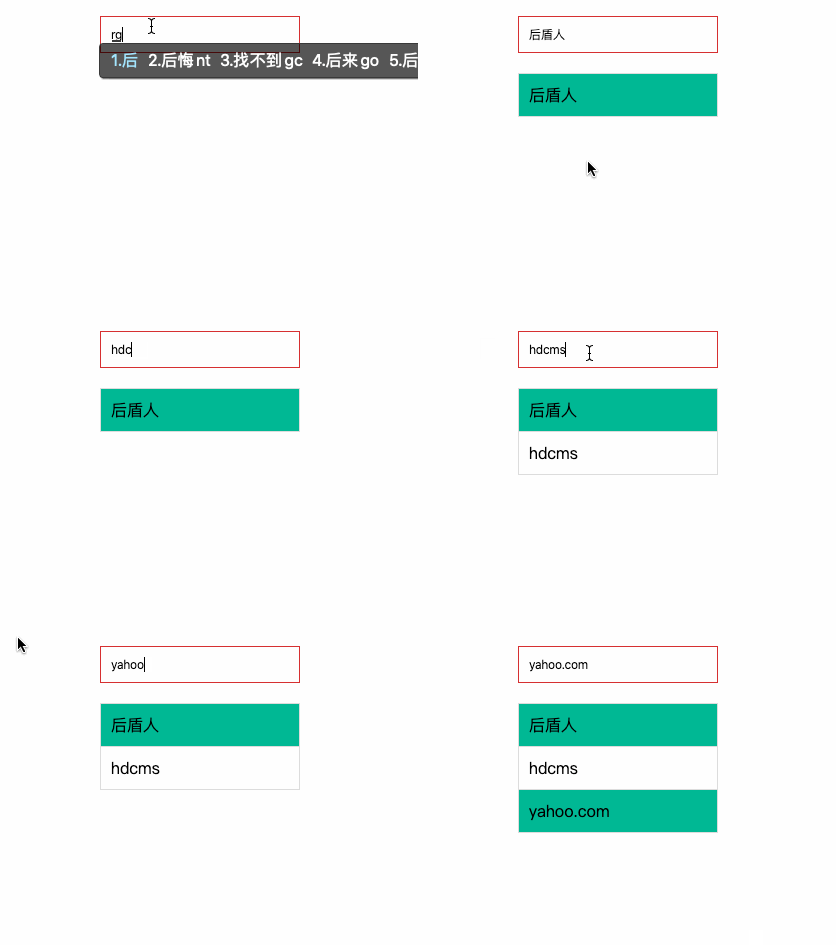
搜索实例
下面通过历史搜索的示例体验Set 类型
<style>
  body {
      padding: 200px;
  }

  * {
      padding: 0;
      margin: 0;
  }

  input {
      width: 200px;
      border: solid 1px  d63031;
      outline: none;
      padding: 10px;
      box-sizing: border-box;
  }

  ul {
      list-style: none;
      width: 200px;
      padding-top: 20px;
  }

  ul li {
      border: solid 1px  ddd;
      padding: 10px;
      margin-bottom: -1px;
  }

  ul li:nth-of-type(odd) {
      background:  00b894;
  }
</style>

<body>
  <input type="text">
  <ul></ul>
</body>
<script>
  let obj = {
      words: new Set(),
      set keyword(word) {
          this.words.add(word);
      },
      show() {
          let ul = document.querySelector('ul');
          ul.innerHTML = '';
          this.words.forEach((item) => {
              ul.innerHTML += ('<li>' + item + '</li>');
          })
      }
  }

  document.querySelector('input').addEventListener('blur', function () {
      obj.keyword = this.value;
      obj.show();
  });
</script>
交集
获取两个集合中共同存在的元素
let hd = new Set(["hdcms", "houdunren"]);
let cms = new Set(["大人", "hdcms"]);
let newSet = new Set([...hd].filter((item) => cms.has(item)));
console.log(newSet); //{"hdcms"}
差集
在集合 a 中出现但不在集合 b 中出现元素集合
let hd = new Set(["hdcms", "houdunren"]);
let cms = new Set(["大人", "hdcms"]);
let newSet = new Set([...hd].filter((item) => !cms.has(item)));
console.log(newSet); //{"houdunren"}
并集
将两个集合合并成一个新的集合,由于 Set 特性当然也不会产生重复元素。
let hd = new Set(["hdcms", "houdunren"]);
let cms = new Set(["大人", "hdcms"]);
let newSet = [...hd, ...cms];
console.log(newSet);
WeakSet
WeakSet 结构同样不会存储重复的值,它的成员必须只能是对象类型的值。
- 垃圾回收不考虑 WeakSet,即被 WeakSet 引用时引用计数器不加一,所以对象不被引用时不管 WeakSet 是否在使用都将删除
- 因为 WeakSet 是弱引用,由于其他地方操作成员可能会不存在,所以不可以进行
forEach( )遍历等操作 - 也是因为弱引用,WeakSet 结构没有 keys( ),values( ),entries( )等方法和 size 属性
- 因为是弱引用所以当外部引用删除时,希望自动删除数据时使用
WeakMap
声明定义
以下操作由于数据不是对象类型将产生错误
new WeakSet(["hdcms", "houdunren"]); //Invalid value used in weak set
new WeakSet("hdcms"); //Invalid value used in weak set
WeakSet 的值必须为对象类型
new WeakSet([["hdcms"], ["houdunren"]]);
将 DOM 节点保存到WeakSet
document.querySelectorAll("button").forEach((item) => Wset.add(item));
基本操作
下面是 WeakSet 的常用指令
const hd = new WeakSet();
const arr = ["hdcms"];
//添加操作
hd.add(arr);
console.log(hd.has(arr));
//删除操作
hd.delete(arr);
//检索判断
console.log(hd.has(arr));
垃圾回收
WeaSet 保存的对象不会增加引用计数器,如果一个对象不被引用了会自动删除。
- 下例中的数组被
arr引用了,引用计数器+1 - 数据又添加到了 hd 的 WeaSet 中,引用计数还是 1
- 当
arr设置为 null 时,引用计数-1 此时对象引用为 0 - 当垃圾回收时对象被删除,这时 WakeSet 也就没有记录了
const hd = new WeakSet();
let arr = ["hdcms"];
hd.add(arr);
console.log(hd.has(arr));
arr = null;
console.log(hd); //WeakSet {Array(1)}
setTimeout(() => {
console.log(hd); //WeakSet {}
}, 1000);
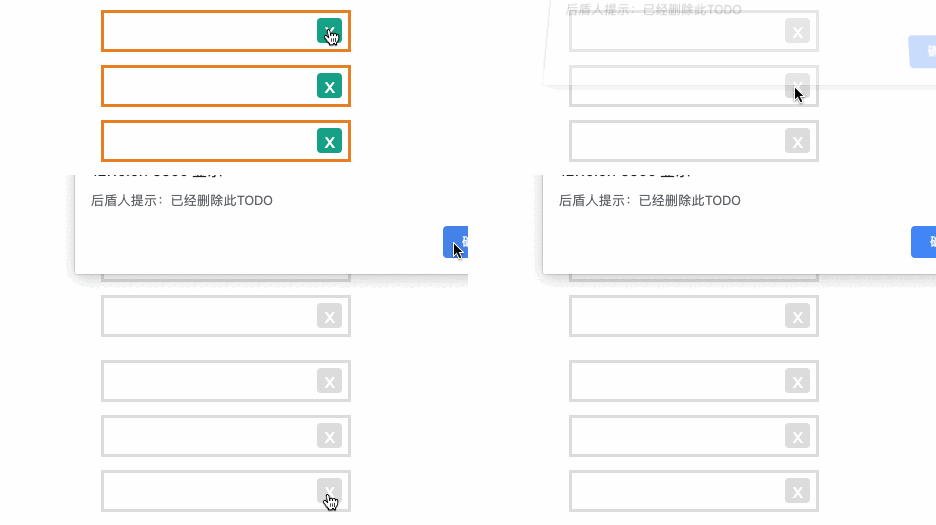
案例操作
<style>
* {
padding: 0;
margin: 0;
}
body {
padding: 200px;
}
ul {
list-style: none;
display: flex;
width: 200px;
flex-direction: column;
}
li {
height: 30px;
border: solid 2px e67e22;
margin-bottom: 10px;
display: flex;
justify-content: space-between;
align-items: center;
padding-left: 10px;
color: 333;
transition: 1s;
}
a {
border-radius: 3px;
width: 20px;
height: 20px;
text-decoration: none;
text-align: center;
background: 16a085;
color: white;
cursor: pointer;
display: flex;
justify-content: center;
align-items: center;
margin-right: 5px;
}
.remove {
border: solid 2px eee;
opacity: 0.8;
color: eee;
}
.remove a {
background: eee;
}
</style>
<body>
<ul>
<li>houdunren.com <a href="javascript:;">x</a></li>
<li>hdcms.com <a href="javascript:;">x</a></li>
<li>houdunwang.com <a href="javascript:;">x</a></li>
</ul>
</body>
<script>
class Todos {
constructor() {}
run() {
this.items = document.querySelectorAll("ul>li");
this.lists = new WeakSet();
this.record();
this.addEvent();
}
addEvent() {
this.items.forEach(item => {
item.querySelector("a").addEventListener("click", event => {
//检测WakeSet中是否存在Li元素
const parentElement = event.target.parentElement;
if (!this.lists.has(parentElement)) {
alert("已经删除此TODO");
} else {
//删除后从记录的WakeSet中移除
parentElement.classList.add("remove");
this.lists.delete(parentElement);
}
});
});
}
record() {
this.items.forEach(item => this.lists.add(item));
}
}
new Todos().run();
</script>
Map
Map 是一组键值对的结构,用于解决以往不能用对象做为键的问题
- 具有极快的查找速度
- 函数、对象、基本类型都可以作为键或值
声明定义
可以接受一个数组作为参数,该数组的成员是一个表示键值对的数组。
let m = new Map([
["houdunren", "大人"],
["hdcms", "开源系统"],
]);
console.log(m.get("houdunren")); //大人
使用set 方法添加元素,支持链式操作
let map = new Map();
let obj = {
name: "大人",
};
map.set(obj, "houdunren.com").set("name", "hdcms");
console.log(map.entries()); //MapIterator {{…} => "houdunren.com", "name" => "hdcms"}
使用构造函数new Map创建的原理如下
const hd = new Map();
const arr = [
["houdunren", "大人"],
["hdcms", "开源系统"],
];
arr.forEach(([key, value]) => {
hd.set(key, value);
});
console.log(hd);
对于键是对象的Map, 键保存的是内存地址,值相同但内存地址不同的视为两个键。
let arr = ["大人"];
const hd = new Map();
hd.set(arr, "houdunren.com");
console.log(hd.get(arr)); //houdunren.com
console.log(hd.get(["大人"])); //undefined
获取数量
获取数据数量
console.log(map.size);
元素检测
检测元素是否存在
console.log(map.has(obj1));
读取元素
let map = new Map();
let obj = {
name: "大人",
};
map.set(obj, "houdunren.com");
console.log(map.get(obj));
删除元素
使用 delete() 方法删除单个元素
let map = new Map();
let obj = {
name: "大人",
};
map.set(obj, "houdunren.com");
console.log(map.get(obj));
map.delete(obj);
console.log(map.get(obj));
使用clear方法清除 Map 所有元素
let map = new Map();
let obj1 = {
name: "hdcms.com",
};
let obj2 = {
name: "houdunren.com",
};
map.set(obj1, {
title: "内容管理系统",
});
map.set(obj2, {
title: "大人",
});
console.log(map.size);
console.log(map.clear());
console.log(map.size);
遍历数据
使用 keys()/values()/entries() 都可以返回可遍历的迭代对象。
let hd = new Map([
["houdunren", "大人"],
["hdcms", "开源系统"],
]);
console.log(hd.keys()); //MapIterator {"houdunren", "hdcms"}
console.log(hd.values()); //MapIterator {"大人", "开源系统"}
console.log(hd.entries()); //MapIterator {"houdunren" => "大人", "hdcms" => "开源系统"}
可以使用keys/values 函数遍历键与值
let hd = new Map([
["houdunren", "大人"],
["hdcms", "开源系统"],
]);
for (const key of hd.keys()) {
console.log(key);
}
for (const value of hd.values()) {
console.log(value);
}
使用for/of遍历操作,直播遍历 Map 等同于使用entries() 函数
let hd = new Map([
["houdunren", "大人"],
["hdcms", "开源系统"],
]);
for (const [key, value] of hd) {
console.log(`${key}=>${value}`);
}
使用forEach遍历操作
let hd = new Map([
["houdunren", "大人"],
["hdcms", "开源系统"],
]);
hd.forEach((value, key) => {
console.log(`${key}=>${value}`);
});
数组转换
可以使用展开语法 或 Array.form 静态方法将 Set 类型转为数组,这样就可以使用数组处理函数了
let hd = new Map([
["houdunren", "大人"],
["hdcms", "开源系统"],
]);
console.log(...hd); //(2) ["houdunren", "大人"] (2) ["hdcms", "开源系统"]
console.log(...hd.entries()); //(2) ["houdunren", "大人"] (2) ["hdcms", "开源系统"]
console.log(...hd.values()); //大人 开源系统
console.log(...hd.keys()); //houdunren hdcms
检索包含大人的值组成新 Map
let hd = new Map([
["houdunren", "大人"],
["hdcms", "开源系统"],
]);
let newArr = [...hd].filter(function (item) {
return item[1].includes("大人");
});
hd = new Map(newArr);
console.log(...hd.keys());
节点集合
map 的 key 可以为任意类型,下面使用 DOM 节点做为键来记录数据。
<body>
<div desc="大人">houdunren</div>
<div desc="开源系统">hdcms</div>
</body>
<script>
const divMap = new Map();
const divs = document.querySelectorAll("div");
divs.forEach(div => {
divMap.set(div, {
content: div.getAttribute("desc")
});
});
divMap.forEach((config, elem) => {
elem.addEventListener("click", function() {
alert(divMap.get(this).content);
});
});
</script>
实例操作
当不接受协议时无法提交表单,并根据自定义信息提示用户。
<form action="" onsubmit="return post()">
接受协议:
<input type="checkbox" name="agreement" message="请接受接受协议" />
我是学生:
<input type="checkbox" name="student" message="网站只对学生开放" />
<input type="submit" />
</form>
</body>
<script>
function post() {
let map = new Map();
let inputs = document.querySelectorAll("[message]");
//使用set设置数据
inputs.forEach(item =>
map.set(item, {
message: item.getAttribute("message"),
status: item.checked
})
);
//遍历Map数据
return [...map].every(([item, config]) => {
config.status || alert(config.message);
return config.status;
});
}
</script>
WeakMap
WeakMap 对象是一组键/值对的集
- 键名必须是对象
- WeaMap 对键名是弱引用的,键值是正常引用
- 垃圾回收不考虑 WeaMap 的键名,不会改变引用计数器,键在其他地方不被引用时即删除
- 因为 WeakMap 是弱引用,由于其他地方操作成员可能会不存在,所以不可以进行
forEach( )遍历等操作 - 也是因为弱引用,WeaMap 结构没有 keys( ),values( ),entries( )等方法和 size 属性
- 当键的外部引用删除时,希望自动删除数据时使用
WeakMap
声明定义
以下操作由于键不是对象类型将产生错误
new WeakSet("hdcms"); //TypeError: Invalid value used in weak set
将 DOM 节点保存到WeakSet
<body>
<div>houdunren</div>
<div>hdcms</div>
</body>
<script>
const hd = new WeakMap();
document
.querySelectorAll("div")
.forEach(item => hd.set(item, item.innerHTML));
console.log(hd); //WeakMap {div => "hdcms", div => "houdunren"}
</script>
基本操作
下面是 WeakSet 的常用指令
const hd = new WeakMap();
const arr = ["hdcms"];
//添加操作
hd.set(arr, "houdunren");
console.log(hd.has(arr)); //true
//删除操作
hd.delete(arr);
//检索判断
console.log(hd.has(arr)); //false
垃圾回收
WakeMap 的键名对象不会增加引用计数器,如果一个对象不被引用了会自动删除。
- 下例当
hd删除时内存即清除,因为 WeakMap 是弱引用不会产生引用计数 - 当垃圾回收时因为对象被删除,这时 WakeMap 也就没有记录了
let map = new WeakMap();
let hd = {};
map.set(hd, "hdcms");
hd = null;
console.log(map);
setTimeout(() => {
console.log(map);
}, 1000);
选课案例
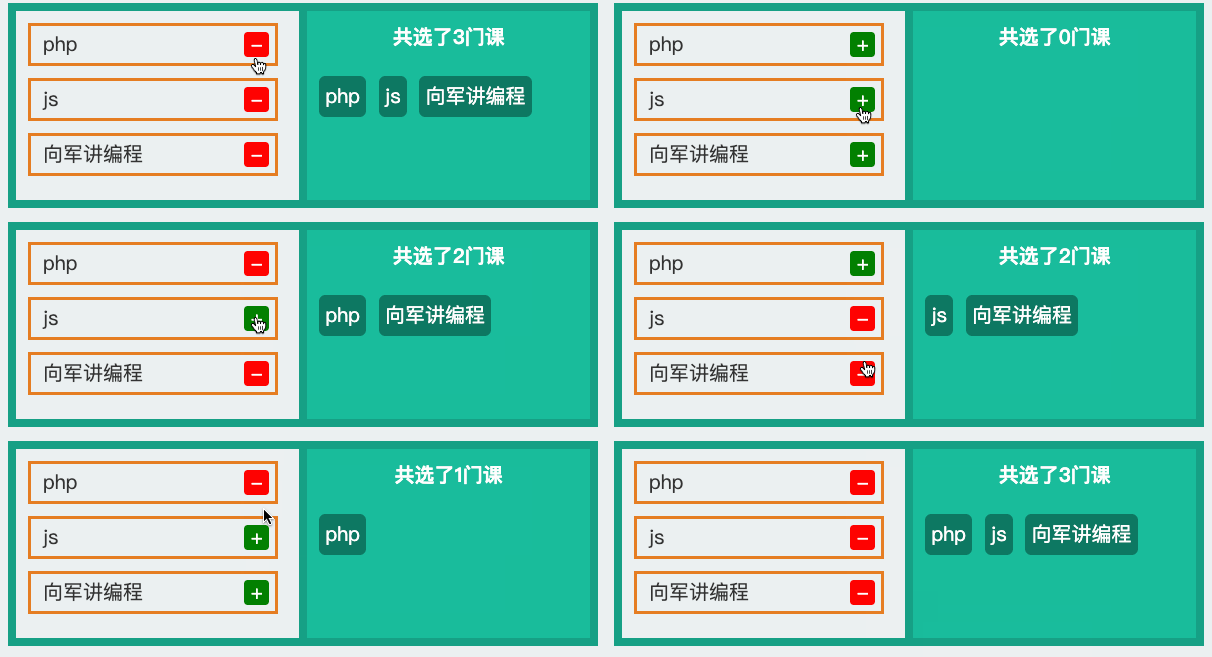
<style>
* {
padding: 0;
margin: 0;
}
body {
padding: 20px;
width: 100vw;
display: flex;
box-sizing: border-box;
}
div {
border: solid 2px ddd;
padding: 10px;
flex: 1;
}
div:last-of-type {
margin-left: -2px;
}
ul {
list-style: none;
display: flex;
width: 200px;
flex-direction: column;
}
li {
height: 30px;
border: solid 2px e67e22;
margin-bottom: 10px;
display: flex;
justify-content: space-between;
align-items: center;
padding-left: 10px;
color: 333;
transition: 1s;
}
a {
border-radius: 3px;
width: 20px;
height: 20px;
text-decoration: none;
text-align: center;
background: 16a085;
color: white;
cursor: pointer;
display: flex;
justify-content: center;
align-items: center;
margin-right: 5px;
}
.remove {
border: solid 2px eee;
opacity: 0.8;
color: eee;
}
.remove a {
background: eee;
}
p {
margin-top: 20px;
}
p span {
display: inline-block;
background: 16a085;
padding: 5px;
color: white;
margin-right: 10px;
border-radius: 5px;
margin-bottom: 10px;
}
</style>
<body>
<div>
<ul>
<li><span>php</span> <a href="javascript:;">+</a></li>
<li><span>js</span> <a href="javascript:;">+</a></li>
<li><span>大军讲编程</span><a href="javascript:;">+</a></li>
</ul>
</div>
<div>
<strong id="count">共选了2门课</strong>
<p id="lists"></p>
</div>
</body>
<script>
class Lesson {
constructor() {
this.lis = document.querySelectorAll("ul>li");
this.countELem = document.getElementById("count");
this.listElem = document.getElementById("lists");
this.map = new WeakMap();
}
run() {
this.lis.forEach(item => {
item.querySelector("a").addEventListener("click", event => {
const elem = event.target;
const state = elem.getAttribute("select");
if (state) {
elem.removeAttribute("select");
this.map.delete(elem.parentElement);
elem.innerHTML = "+";
elem.style.backgroundColor = "green";
} else {
elem.setAttribute("select", true);
this.map.set(elem.parentElement, true);
elem.innerHTML = "-";
elem.style.backgroundColor = "red";
}
this.render();
});
});
}
count() {
return [...this.lis].reduce((count, item) => {
return (count += this.map.has(item) ? 1 : 0);
}, 0);
}
lists() {
return [...this.lis]
.filter(item => {
return this.map.has(item);
})
.map(item => {
return `<span>${item.querySelector("span").innerHTML}</span>`;
});
}
render() {
this.countELem.innerHTML = `共选了${this.count()}课`;
this.listElem.innerHTML = this.lists().join("");
}
}
new Lesson().run();
</script>
基础知识
函数是将复用的代码块封装起来的模块,在 JS 中函数还有其他语言所不具有的特性,接下来我们会详细掌握使用技巧。
声明定义
在 JS 中函数也是对象函数是Function类的创建的实例,下面的例子可以方便理解函数是对象。
let hd = new Function("title", "console.log(title)");
hd("大人");
标准语法是使用函数声明来定义函数
function hd(num) {
return ++num;
}
console.log(hd(3));
对象字面量属性函数简写
let user = {
name: null,
getName: function (name) {
return this.name;
},
//简写形式
setName(value) {
this.name = value;
},
};
user.setName("大人");
console.log(user.getName()); // 大人
全局函数会声明在 window 对象中,这不正确建议使用后面章节的模块处理
console.log(window.screenX); //2200
当我们定义了 screenX 函数后就覆盖了 window.screenX 方法
function screenX() {
return "大人";
}
console.log(screenX()); //大人
使用let/const时不会压入 window
let hd = function () {
console.log("大人");
};
window.hd(); //window.hd is not a function
匿名函数
函数是对象所以可以通过赋值来指向到函数对象的指针,当然指针也可以传递给其他变量,注意后面要以;结束。下面使用函数表达式将 匿名函数 赋值给变量
let hd = function (num) {
return ++num;
};
console.log(hd instanceof Object); //true
let cms = hd;
console.log(cms(3));
标准声明的函数优先级更高,解析器会优先提取函数并放在代码树顶端,所以标准声明函数位置不限制,所以下面的代码可以正常执行。
console.log(hd(3));
function hd(num) {
return ++num;
}
标准声明优先级高于赋值声明
console.log(hd(3)); //4
function hd(num) {
return ++num;
}
var hd = function () {
return "hd";
};
程序中使用匿名函数的情况非常普遍
function sum(...args) {
return args.reduce((a, b) => a + b);
}
console.log(sum(1, 2, 3));
立即执行
立即执行函数指函数定义时立即执行
- 可以用来定义私有作用域防止污染全局作用域
"use strict";
(function () {
var web = "houdunren";
})();
console.log(web); //web is not defined
使用 let/const 有块作用域特性,所以使用以下方式也可以产生私有作用域
{
let web = "houdunren";
}
console.log(web);
函数提升
函数也会提升到前面,优先级行于var变量提高
console.log(hd()); //大人
function hd() {
return "大人";
}
变量函数定义不会被提升
console.log(hd()); //大人
function hd() {
return "大人";
}
var hd = function () {
return "hdcms.com";
};
形参实参
形参是在函数声明时设置的参数,实参指在调用函数时传递的值。
- 形参数量大于实参时,没有传参的形参值为 undefined
- 实参数量大于形参时,多于的实参将忽略并不会报错
// n1,n2 为形参
function sum(n1, n2) {
return n1 + n2;
}
// 参数 2,3 为实参
console.log(sum(2, 3)); //5
当没传递参数时值为 undefined
function sum(n1, n2) {
return n1 + n2;
}
console.log(sum(2)); //NaN
默认参数
下面通过计算年平均销售额来体验以往默认参数的处理方式
//total:总价 year:年数
function avg(total, year) {
year = year || 1;
return Math.round(total / year);
}
console.log(avg(2000, 3));
使用新版本默认参数方式如下
function avg(total, year = 1) {
return Math.round(total / year);
}
console.log(avg(2000, 3));
下面通过排序来体验新版默认参数的处理方式,下例中当不传递 type 参数时使用默认值 asc。
function sortArray(arr, type = "asc") {
return arr.sort((a, b) => (type == "asc" ? a - b : b - a));
}
console.log(sortArray([1, 3, 2, 6], "desc"));
默认参数要放在最后面
//total:价格,discount:折扣,dis:折后折
function sum(total, discount = 0, dis = 0) {
return total * (1 - discount) * (1 - dis);
}
console.log(sum(2000, undefined, 0.3));
函数参数
函数可以做为参数传递,这也是大多数语言都支持的语法规则。
<body>
<button>订阅</button>
</body>
<script>
document.querySelector('button').addEventListener('click', function () {
alert('感谢订阅');
})
</script>
函数可以做为参数传递
function filterFun(item) {
return item <= 3;
}
let hd = [1, 2, 3, 4, 5].filter(filterFun);
console.log(hd); //[1,2,3]
arguments
arguments 是函数获得到所有参数集合,下面是使用 arguments 求和的例子
function sum() {
return [...arguments].reduce((total, num) => {
return (total += num);
}, 0);
}
console.log(sum(2, 3, 4, 2, 6)); //17
更建议使用展示语法
function sum(...args) {
return args.reduce((a, b) => a + b);
}
console.log(sum(2, 3, 4, 2, 6)); //17
箭头函数
箭头函数是函数声明的简写形式,在使用递归调用、构造函数、事件处理器时不建议使用箭头函数。
无参数时使用空扩号即可
let sum = () => {
return 1 + 3;
};
console.log(sum()); //4
函数体为单一表达式时不需要 return 返回处理,系统会自动返回表达式计算结果。
let sum = () => 1 + 3;
console.log(sum()); //4
多参数传递与普通声明函数一样使用逗号分隔
let hd = [1, 8, 3, 5].filter((item, index) => {
return item <= 3;
});
console.log(hd);
只有一个参数时可以省略括号
let hd = [1, 8, 3, 5].filter((item) => item <= 3);
console.log(hd);
有关箭头函数的作用域知识会在后面章节讨论
递归调用
递归指函数内部调用自身的方式。
- 主要用于数量不确定的循环操作
- 要有退出时机否则会陷入死循环
下面通过阶乘来体验递归调用
function factorial(num = 3) {
return num == 1 ? num : num * factorial(--num);
}
console.log(factorial(5)); //120
累加计算方法
function sum(...num) {
return num.length == 0 ? 0 : num.pop() + sum(...num);
}
console.log(sum(1, 2, 3, 4, 5, 7, 9)); //31
递归打印倒三角
******
*****
****
***
**
*
function star(row = 5) {
if (row == 0) return "";
document.write("*".repeat(row) + "<br/>");
star(--row);
}
使用递归修改课程点击数
let lessons = [
{
title: "媒体查询响应式布局",
click: 89,
},
{
title: "FLEX 弹性盒模型",
click: 45,
},
{
title: "GRID 栅格系统",
click: 19,
},
{
title: "盒子模型详解",
click: 29,
},
];
function change(lessons, num, i = 0) {
if (i == lessons.length) {
return lessons;
}
lessons[i].click += num;
return change(lessons, num, ++i);
}
console.table(change(lessons, 100));
回调函数
在某个时刻被其他函数调用的函数称为回调函数,比如处理键盘、鼠标事件的函数。
<button id='hd'>button</button>
<script>
document.getElementById('hd').addEventListener('click', () => alert('通过回调函数调用'));
</script>
使用回调函数递增计算
let hd = [1, 2, 3].map((item) => item + 10);
console.log(hd);
展开语法
展示语法或称点语法体现的就是收/放特性,做为值时是放,做为接收变量时是收。
let hd = [1, 2, 3];
let [a, b, c] = [...hd];
console.log(a); //1
console.log(b); //2
console.log(c); //3
[...hd] = [1, 2, 3];
console.log(hd); //[1, 2, 3]
使用展示语法可以替代 arguments 来接收任意数量的参数
function hd(...args) {
console.log(args);
}
hd(1, 2, 3, "大人"); //[1, 2, 3, "大人"]
也可以用于接收部分参数
function hd(site, ...args) {
console.log(site, args); //大人 (3) [1, 2, 3]
}
hd("大人", 1, 2, 3);
使用 ... 可以接受传入的多个参数合并为数组,下面是使用点语法进行求合计算。
function sum(...params) {
console.log(params);
return params.reduce((pre, cur) => pre + cur);
}
console.log(sum(1, 3, 2, 4));
多个参数时...参数必须放后面,下面计算购物车商品折扣
function sum(discount = 0, ...prices) {
let total = prices.reduce((pre, cur) => pre + cur);
return total * (1 - discount);
}
console.log(sum(0.1, 100, 300, 299));
标签函数
使用函数来解析标签字符串,第一个参数是字符串值的数组,其余的参数为标签变量。
function hd(str, ...values) {
console.log(str); //["站点", "-", "", raw: Array(3)]
console.log(values); //["大人", "houdunren.com"]
}
let name = "大人",
url = "houdunren.com";
hd`站点${name}-${url}`;
this
调用函数时 this 会隐式传递给函数指函数调用时的关联对象,也称之为函数的上下文。
函数调用
全局环境下this就是 window 对象的引用
<script>console.log(this == window); //true</script>
使用严格模式时在全局函数内this为undefined
var hd = "大人";
function get() {
"use strict";
return this.hd;
}
console.log(get());
//严格模式将产生错误 Cannot read property 'name' of undefined
方法调用
函数为对象的方法时this 指向该对象
可以使用多种方式创建对象,下面是使用构造函数创建对象
构造函数
函数当被 new 时即为构造函数,一般构造函数中包含属性与方法。函数中的上下文指向到实例对象。
- 构造函数主要用来生成对象,里面的 this 默认就是指当前对象
function User() {
this.name = "大人";
this.say = function () {
console.log(this); //User {name: "大人", say: ƒ}
return this.name;
};
}
let hd = new User();
console.log(hd.say()); //大人
对象字面量
- 下例中的 hd 函数不属于对象方法所以指向
window - show 属于对象方法执向
obj对象
let obj = {
site: "大人",
show() {
console.log(this.site); //大人
console.log(`this in show method: ${this}`); //this in show method: [object Object]
function hd() {
console.log(typeof this.site); //undefined
console.log(`this in hd function: ${this}`); //this in hd function: [object Window]
}
hd();
},
};
obj.show();
在方法中使用函数时有些函数可以改变 this 如forEach,当然也可以使用后面介绍的apply/call/bind
let Lesson = {
site: "大人",
lists: ["js", "css", "mysql"],
show() {
return this.lists.map(function (title) {
return `${this.site}-${title}`;
}, this);
},
};
console.log(Lesson.show());
也可以在父作用域中定义引用this的变量
let Lesson = {
site: "大人",
lists: ["js", "css", "mysql"],
show() {
const self = this;
return this.lists.map(function (title) {
return `${self.site}-${title}`;
});
},
};
console.log(Lesson.show());
箭头函数
箭头函数没有this, 也可以理解为箭头函数中的this 会继承定义函数时的上下文,可以理解为和外层函数指向同一个 this。
- 如果想使用函数定义时的上下文中的 this,那就使用箭头函数
下例中的匿名函数的执行环境为全局所以 this 指向 window。
var name = "hdcms";
var obj = {
name: "大人",
getName: function () {
return function () {
return this.name;
};
},
};
console.log(obj.getName()()); //返回window.name的值hdcms
以往解决办法会匿名函数调用处理定义变量,然后在匿名函数中使用。
var name = "hdcms";
var obj = {
name: "大人",
getName: function () {
var self = this;
return () => {
return this.name;
};
},
};
console.log(obj.getName()()); //返回window.name的值hdcms
使用箭头函数后 this 为定义该函数的上下文,也可以理解为定义时父作用域中的this
var name = "hdcms";
var obj = {
name: "大人",
getName: function () {
return () => {
return this.name;
};
},
};
console.log(obj.getName()()); //大人
事件中使用箭头函数结果不是我们想要的
- 事件函数可理解为对象
onclick设置值,所以函数声明时this为当前对象 - 但使用箭头函数时
this为声明函数上下文
下面体验使用普通事件函数时this指向元素对象
使用普通函数时this为当前 DOM 对象
<body>
<button desc="hdcms">button</button>
</body>
<script>
let Dom = {
site: "大人",
bind() {
const button = document.querySelector("button");
button.addEventListener("click", function() {
alert(this.getAttribute("desc"));
});
}
};
Dom.bind();
</script>
下面是使用箭头函数时 this 指向上下文对象
<body>
<button desc="hdcms">button</button>
</body>
<script>
let Dom = {
site: "大人",
bind() {
const button = document.querySelector("button");
button.addEventListener("click", event => {
alert(this.site + event.target.innerHTML);
});
}
};
Dom.bind();
</script>
使用handleEvent绑定事件处理器时,this指向当前对象而不是 DOM 元素。
<body>
<button desc="hdcms">button</button>
</body>
<script>
let Dom = {
site: "大人",
handleEvent: function(event) {
console.log(this);
},
bind() {
const button = document.querySelector("button");
button.addEventListener("click", this);
}
};
Dom.bind();
</script>
apply/call/bind
改变 this 指针,也可以理解为对象借用方法,就现像生活中向邻居借东西一样的事情。
原理分析
构造函数中的this默认是一个空对象,然后构造函数处理后把这个空对象变得有值。
function User(name) {
this.name = name;
}
let hd = new User("大人");
可以改变构造函数中的空对象,即让构造函数 this 指向到另一个对象。
function User(name) {
this.name = name;
}
let hdcms = {};
User.call(hdcms, "HDCMS");
console.log(hdcms.name); //HDCMS
apply/call
call 与 apply 用于显示的设置函数的上下文,两个方法作用一样都是将对象绑定到 this,只是在传递参数上有所不同。
- apply 用数组传参
- call 需要分别传参
- 与 bind 不同 call/apply 会立即执行函数
语法使用介绍
function show(title) {
alert(`${title + this.name}`);
}
let lisi = {
name: "李四",
};
let wangwu = {
name: "王五",
};
show.call(lisi, "大人");
show.apply(wangwu, ["HDCMS"]);
使用 call 设置函数上下文
<body>
<button message="大人">button</button>
<button message="hdcms">button</button>
</body>
<script>
function show() {
alert(this.getAttribute('message'));
}
let bts = document.getElementsByTagName('button');
for (let i = 0; i < bts.length; i++) {
bts[i].addEventListener('click', () => show.call(bts[i]));
}
</script>
找数组中的数值最大值
let arr = [1, 3, 2, 8];
console.log(Math.max(arr)); //NaN
console.log(Math.max.apply(Math, arr)); //8
console.log(Math.max(...arr)); //8
实现构造函数属性继承
"use strict";
function Request() {
this.get = function (params = {}) {
//组合请求参数
let option = Object.keys(params)
.map((i) => i + "=" + params[i])
.join("&");
return `获取数据 API:${this.url}?${option}`;
};
}
//文章控制器
function Article() {
this.url = "article/index";
Request.apply(this, []);
}
let hd = new Article();
console.log(
hd.get({
row: 10,
start: 3,
})
);
//课程控制器
function Lesson() {
this.url = "lesson/index";
Request.call(this);
}
let js = new Lesson();
console.log(
js.get({
row: 20,
})
);
制作显示隐藏面板
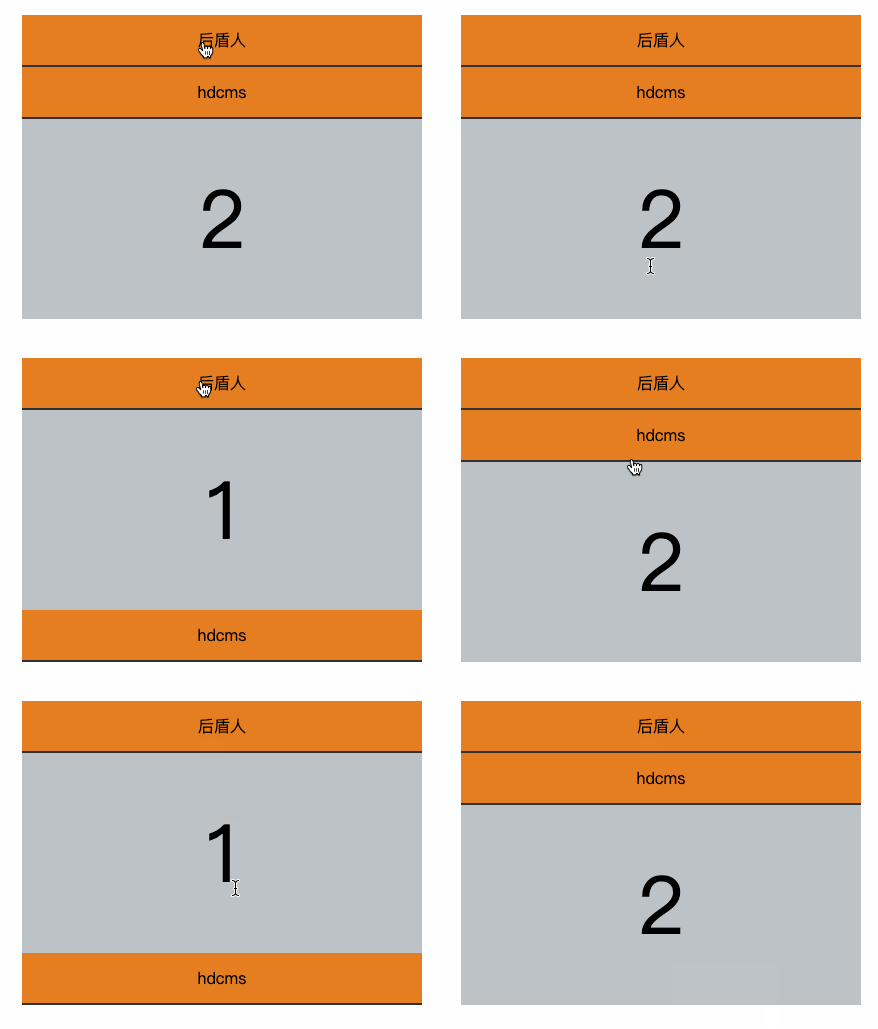
<style>
* {
padding: 0;
margin: 0;
}
body {
display: flex;
justify-content: center;
align-items: center;
width: 100vw;
height: 100vh;
}
dl {
width: 400px;
display: flex;
flex-direction: column;
}
dt {
background: e67e22;
border-bottom: solid 2px 333;
height: 50px;
display: flex;
justify-content: center;
align-items: center;
cursor: pointer;
}
dd {
height: 200px;
background: bdc3c7;
font-size: 5em;
text-align: center;
line-height: 200px;
}
</style>
<body>
<dl>
<dt>大人</dt>
<dd>1</dd>
<dt>hdcms</dt>
<dd hidden="hidden">2</dd>
</dl>
</body>
<script>
function panel(i) {
let dds = document.querySelectorAll("dd");
dds.forEach(item => item.setAttribute("hidden", "hidden"));
dds[i].removeAttribute("hidden");
}
document.querySelectorAll("dt").forEach((dt, i) => {
dt.addEventListener("click", () => panel.call(null, i));
});
</script>
bind
bind()是将函数绑定到某个对象,比如 a.bind(hd) 可以理解为将 a 函数绑定到 hd 对象上即 hd.a()。
- 与 call/apply 不同 bind 不会立即执行
- bind 是复制函数形为会返回新函数
bind 是复制函数行为
let a = function () {};
let b = a;
console.log(a === b); //true
//bind是新复制函数
let c = a.bind();
console.log(a == c); //false
绑定参数注意事项
function hd(a, b) {
return this.f + a + b;
}
//使用bind会生成新函数
let newFunc = hd.bind({ f: 1 }, 3);
//1+3+2 参数2赋值给b即 a=3,b=2
console.log(newFunc(2));
在事件中使用bind
<body>
<button>大人</button>
</body>
<script>
document.querySelector("button").addEventListener(
"click",
function(event) {
console.log(event.target.innerHTML + this.url);
}.bind({ url: "houdunren.com" })
);
</script>
动态改变元素背景颜色,当然下面的例子也可以使用箭头函数处理

<style>
* {
padding: 0;
margin: 0;
}
body {
width: 100vw;
height: 100vh;
font-size: 3em;
padding: 30px;
transition: 2s;
display: flex;
justify-content: center;
align-items: center;
background: 34495e;
color: 34495e;
}
</style>
<body>
houdunren.com
</body>
<script>
function Color(elem) {
this.elem = elem;
this.colors = [" 74b9ff", " ffeaa7", " fab1a0", " fd79a8"];
this.run = function() {
setInterval(
function() {
let pos = Math.floor(Math.random() * this.colors.length);
this.elem.style.background = this.colors[pos];
}.bind(this),
1000
);
};
}
let obj = new Color(document.body);
obj.run();
</script>
作用域
全局作用域只有一个,每个函数又都有作用域(环境)。
- 编译器运行时会将变量定义在所在作用域
- 使用变量时会从当前作用域开始向上查找变量
- 作用域就像攀亲亲一样,晚辈总是可以向上辈要些东西
使用规范
作用域链只向上查找,找到全局 window 即终止,应该尽量不要在全局作用域中添加变量。
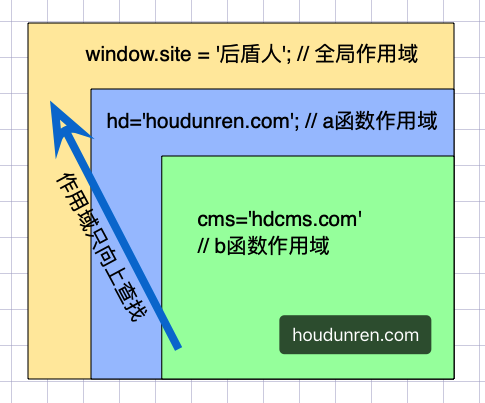
函数被执行后其环境变量将从内存中删除。下面函数在每次执行后将删除函数内部的 total 变量。
function count() {
let total = 0;
}
count();
函数每次调用都会创建一个新作用域
let site = "大人";
function a() {
let hd = "houdunren.com";
function b() {
let cms = "hdcms.com";
console.log(hd);
console.log(site);
}
b();
}
a();
如果子函数被使用时父级环境将被保留
function hd() {
let n = 1;
return function () {
let b = 1;
return function () {
console.log(++n);
console.log(++b);
};
};
}
let a = hd()();
a(); //2,2
a(); //3,3
构造函数也是很好的环境例子,子函数被外部使用父级环境将被保留
function User() {
let a = 1;
this.show = function () {
console.log(a++);
};
}
let a = new User();
a.show(); //1
a.show(); //2
let b = new User();
b.show(); //1
let/const
使用 let/const 可以将变量声明在块作用域中(放在新的环境中,而不是全局中)
{
let a = 9;
}
console.log(a); //ReferenceError: a is not defined
if (true) {
var i = 1;
}
console.log(i); //1
也可以通过下面的定时器函数来体验
for (let i = 0; i < 10; i++) {
setTimeout(() => {
console.log(i);
}, 500);
}
在 for 循环中使用let/const 会在每一次迭代中重新生成不同的变量
let arr = [];
for (let i = 0; i < 10; i++) {
arr.push(() => i);
}
console.log(arr[3]()); //3 如果使用var声明将是10
在没有let/const 的历史中使用以下方式产生作用域
//自行构建闭包
var arr = [];
for (var i = 0; i < 10; i++) {
(function (a) {
arr.push(() => a);
})(i);
}
console.log(arr[3]()); //3
闭包使用
闭包指子函数可以访问外部作用域变量的函数特性,即使在子函数作用域外也可以访问。如果没有闭包那么在处理事件绑定,异步请求时都会变得困难。
- JS 中的所有函数都是闭包
- 闭包一般在子函数本身作用域以外执行,即延伸作用域
基本示例
前面在讲作用域时已经在使用闭包特性了,下面再次重温一下闭包。
function hd() {
let name = "大人";
return function () {
return name;
};
}
let hdcms = hd();
console.log(hdcms()); //大人
使用闭包返回数组区间元素
let arr = [3, 2, 4, 1, 5, 6];
function between(a, b) {
return function (v) {
return v >= a && v <= b;
};
}
console.log(arr.filter(between(3, 5)));
下面是在回调函数中使用闭包,当点击按钮时显示当前点击的是第几个按钮。
<body>
<button message="大人">button</button>
<button message="hdcms">button</button>
</body>
<script>
var btns = document.querySelectorAll("button");
for (let i = 0; i < btns.length; i++) {
btns[i].onclick = (function(i) {
return function() {
alert(`点击了第${i + 1}个按钮`);
};
})(i);
}
</script>
移动动画
计时器中使用闭包来获取独有变量
<body>
<style>
button {
position: absolute;
}
</style>
<button message="大人">houdunren</button>
<!-- <button message="hdcms">hdcms</button> -->
</body>
<script>
let btns = document.querySelectorAll("button");
btns.forEach(function(item) {
let bind = false;
item.addEventListener("click", function() {
if (!bind) {
let left = 1;
bind = setInterval(function() {
item.style.left = left++ + "px";
}, 100);
}
});
});
</script>
闭包排序
下例使用闭包按指定字段排序
let lessons = [
{
title: "媒体查询响应式布局",
click: 89,
price: 12,
},
{
title: "FLEX 弹性盒模型",
click: 45,
price: 120,
},
{
title: "GRID 栅格系统",
click: 19,
price: 67,
},
{
title: "盒子模型详解",
click: 29,
price: 300,
},
];
function order(field) {
return (a, b) => (a[field] > b[field] ? 1 : -1);
}
console.table(lessons.sort(order("price")));
闭包问题
内存泄漏
闭包特性中上级作用域会为函数保存数据,从而造成的如下所示的内存泄漏问题
<body>
<div desc="houdunren">在线学习</div>
<div desc="hdcms">开源产品</div>
</body>
<script>
let divs = document.querySelectorAll("div");
divs.forEach(function(item) {
item.addEventListener("click", function() {
console.log(item.getAttribute("desc"));
});
});
</script>
下面通过清除不需要的数据解决内存泄漏问题
let divs = document.querySelectorAll("div");
divs.forEach(function (item) {
let desc = item.getAttribute("desc");
item.addEventListener("click", function () {
console.log(desc);
});
item = null;
});
this 指向
this 总是指向调用该函数的对象,即函数在搜索 this 时只会搜索到当前活动对象。
下面是函数因为是在全局环境下调用的,所以 this 指向 window,这不是我们想要的。
let hd = {
user: "大人",
get: function () {
return function () {
return this.user;
};
},
};
console.log(hd.get()()); //undefined
使用箭头函数解决这个问题
let hd = {
user: "大人",
get: function () {
return () => this.user;
},
};
console.log(hd.get()()); //undefined