插件 webpack-bundle-analyzer
生成代码分析报告
webpack 实战
- yarn init -y
- yarn add webpack
- pnpm install webpack webpack-cli -D
webpack 可以是 0 配置
手动配置
- 默认配置文件得名字是 webpack.config.js
yarn add  less less-loader style-loader -D
pnpm i css-loader style-loader -D


pnpm i mini-css-extract-plugin  -D  # 抽离css插件

# 自动添加前缀
pnpm i postcss-loader autoprefixer -D


#  css压缩
#  npmjs.com/package/mini-css-extract-plugin
pnpm i optimize-css-assets-webpack-plugin -D
# 如果用了上面插件就需要使用
pnpm i uglifyjs-webpack-plugin -D
#
将 es6 转换成 ex5
pnpm i babel-loader @babel/core @babel/preset-env -D

pnpm add @babel/polyfill
代码检测工具
https://eslint.org/


pnpm i eslint eslint-loader
第三方模块
pnpm i jquery
expose-loader 暴露全局的 loader 内联 loader
pnpm i add expose-loader;
import $ from "expose-loader?$!jquery";
window.$;
同上
rules:[
{
        test: require.resolve("jquery"),
        use: "expose-loader?$",
      },
]
全局注入
const webpack = require("webpack");

module.exports = {
  plugins: [
    new webpack.ProvidePlugin({
      $: "jquery", //每个模块中都注入
    }),
  ],
};
总结
- expose-loader 暴漏到 window
- providePlugin 给每个提供一个$
- 引入不打包
webpack 打包我们的图片
- 在 js 中创建图片来引入
- 在 css 引入 background('url')
// pnpm i file-loader -D  默认会在内部生成一张图片到build目录下
// 把生成的图片的名字返回
// rules:[{
//     test:/\.(png|jpg|gif)$/,
//     use:'file-loader'
// }]

import logo from "./logo.png"; // 把图片引入,返回的结果是一个新的图片地址
let image = new Image();

image.src = logo; // 就是一个普通的字符串

document.body.appendChild(image);
body {
  background: red;
  background: url(require("./logo.png"));
  /* css-loader 默认是支持的 */
  background: url("./logo.png");
}
pnpm i html-withimg-loader -D 解决 html 的图片问题
rules:[
    {
        text:/\.html$/,
        use:'html-withimg-loader',
    }
]

<img src="./logo.png"  alt =""/>
将小图片变成 base64
- url-loader
rules:[
    {
        text:/\.(png|jpg|gif)$/,
        <!-- 做一个限制 当图片小于多少k用base64 -->
        <!-- 否则使用file-loader 产生真实的图片 -->
        use:{
            loader:'url-loader',
            options:{
                limit:200 *1024
            }
        },
    }
]

<img src="./logo.png"  alt =""/>
多页面应用
// webpack.config.js
let path = require("path");

let HtmlWebpackPlugin = require("html-webpack-plugin");

module.exports = {
  mode: "development",
  entry: {
    home: "./src/index.js",
    other: "./src/index.js",
  },
  output: {
    // [name] home other
    filename: "[name].[hash].js",
    path: path.resolve(__dirname, "dist"),
  },
  plugins: [
    // html-webpack-plugin -D  用来使用模板生成html
    new HtmlWebpackPlugin({
      teamplate: "./index.html",
      filename: "home.html",
      chunks: ["home"],
    }),
    new HtmlWebpackPlugin({
      teamplate: "./index.html",
      filename: "other.html",
      chunks: ["other", "home"],
    }),
  ],
};
webpack 中的一些小插件
- cleanWebpackPlugin new CleanWebpackPlugin('./dist')
- copyWebpackPlugin
new copyWebpackPlugin([{from:'./doc',to:'./'}])
- bannerPlugin 内置 版权声明插件
let webpack = require("webpack");
new webPack.BannerPlugin("make 2019");
webpack 跨域问题
// server.js
let express = require("express");
let app = express();
app.get("/api/use", (req, res) => {
  res.json({ name: "xxx" });
});

app.listen(3000);
// index.js
let xhr = new XMLHttpRequest();
xhr.open("GET", "/api/user", true);
xhr.onload = function () {
  console.log(xhr.response);
};
xhr.send();
const devServer = {
  proxy: {
    //1
    // '/api':'http://localhost:3000'
    //2
    // '/api':{
    //   target:'http://localhost:3000',
    //   pathRewrite:{//重写的方式把请求代理到其他服务器
    //     '/api':'',
    //   },
    // }
    //3 模拟数据
    // before(app) {
    //   //提供的方法
    //   app.get("/api/use", (req, res) => {
    //     res.json({ name: "xxx" });
    //   });
    // },
  },
};
4 有服务端 不用用代理来处理,能不能再服务端启动 webpack 端口用服务端端口
- yarn add webpack-dev-middleware webpack -D 开发服务的中间件
// server.js
const express = require("express");
const app = express();
const webpack = require("webpack");
const middle = require("webpack-dev-middleware");

let config = require("./webpack.config.js");
const compiler = webpack(config);
app.use(middle(compiler));

app.get("/user", (req, res) => {
  res.json({ name: "xx" });
});
app.listen(3000);

// 直接运行 node server.js
开发和构建配置区分开
- yarn add webpack-merge -D
webpack.base.js
//
webpack.dev.js
const { smart } = require("webpack-merge");
let base = require("./webpack.base.js");
module.exports = smart(base, {
  mode: "development",
  devServer: {},
  devtool: "source-map",
});
webpack.prod.js
const { smart } = require("webpack-merge");
let base = require("./webpack.base.js");
module.exports = smart(base, {
  mode: "production",
  optimization: {
    minimizer: {},
  },
  plugins: [],
});
npm run build -- --config webpack.dev.js
webpack 优化
const rules = [
  {
    test: /\.js$/,
    exclude: /node_modules/, //排除node_modules
    include: path.resolve("src"), //只找src目录
    use: {
      loader: "babel-loader",
    },
  },
];
moment 时间插件
- yarn add moment
import moment from "moment";

// 设置语言
moment.locale("zh-cn");
//距离现在有多少天
let r = moment().endOf("day").fromNow();
console.log(r);
- 手动引入所需要的语言包
import "moment/locale/zh-cn";
moment.locale("zh-cn");
const webpack = require("webpack");

const plugins = [
  new webpack.IgnorePlugin(/\.\/locale/, /moment/), //引入的时候忽略掉
];
动态链接库
- yarn add react react-dom
import React from "react";
import { render } from "react-dom";

render(<h1>jsx</h1>, window.root);
<body>
  <div id="root"></div>
  <!-- 直接使用动态链接库,先打包动态链接库 -->
  <script src="/_dll_react.js"></script>
</body>
- webpack.config.js
module.exports = {
  devServer: {
    port: 3000,
    open: true,
    contentBase: "./dist",
  },
  rules: [
    {
      text: /\.js$/,
      exclude: /node_modules/,
      include: path.resolve("src"),
      use: {
        loader: "babel-loader",
        options: {
          presets: ["@babel/preset-env", "@babel/preset-react"],
        },
      },
    },
  ],
  plugins: [
    new webpack.DllReferencePlugin({
      mainifest: path.resolve(__dirname, "dist", "manifest.json"),
    }),
  ],
};
- webpack.config.react.js
let path = require("path");
let webpack = require("webpack");
module.exports = {
  mode: "development",
  entry: {
    // test: "./src/test.js",
    react: ["react", "react-dom"],
  },
  output: {
    // filename: "[name].js",
    filename: "_dll_[name].js", //产生的文件名
    path: path.resolve(__dirname, "dist"),
    // library: "a", //默认打包结果给一个变量 var a = 结果
    library: "_dll_[name]", //_dll_react
    libraryTarget: "var",
    libraryTarget: "commonjs", //结果放exports属性上  exports['a']=结果
    libraryTarget: "umd", //umd模式
  },
  plugins: [
    new webpack.DllPlugin({
      //name == library
      name: "_dll_[name]",
      path: path.resolve(__dirname, "dist", "manifest.json"), //清单
    }),
  ],
};

// npx webpack --config webpack.config.react.js
多线程打包
let webpack = require("webpack");
//模块 happypack 可以实现多现成打包
// yarn add happypack
let Happypack = require("happypack");
module.exports = {
  module: {
    noParse: /jquery/, //不去解析jquery中的依赖库
    rules: [
      {
        test: /\.js$/,
        exclude: /node_modules/,
        include: path.resolve("src"),
        use: "Happypack/loader?id=js", //打包js
      },
      {
        test: /\.css$/,
        use: "Happypack/loader?id=css",
        // use: ["style-loader", "css-loader"],
      },
    ],
  },
  plugins: [
    new Happypack({
      id: "css",
      use: ["style-loader", "css-loader"],
    }),
    new Happypack({
      id: "js",
      use: [
        {
          loader: "babel-loader",
          options: {
            presets: ["@babel/preset-env", "@babel/preset-react"],
          },
        },
      ],
    }),
  ],
};
webpack 自带的优化功能
let add = (a, b) => {
  return a + b + "add";
};

let minus = (a, b) => {
  return a - b + "minus";
};

export default {
  sum,
  minus,
};
import calc from "./test";
// 默认import 在生产环境下 会自动去除掉没有使用的代码-tree-shaking
//  require('.test')
// es6模块会把结果放到 default
console.log(calc.default.add(1, 2));
// console.log(calc.add(1, 2));

// scope hosting 作用域提升
let a = 1;
let b = 2;
let d = a + b; // 在webpack中自动省略可以简化的代码
console.log(d, "----");
// production下
// 打包成 console.log(3);
抽取公共代码
module.exports = {
  optimization: {
    //commonChunkPlugins
    // minizer:{}//压缩的
    splitChunks: {
      //分割代码块
      cacheGroups: {
        //缓存组
        common: {
          chunks: "initial", //刚开是就抽离 不考虑异步
          //公共的模块
          miniSize: 0, //大小大于0 就抽离
          // 使用多少次才抽离
          miniChunks: 2,
        },
        // 第三方抽离
        vendor: {
          priority: 1, //权重 先抽离第三方模块 再抽离上面的
          test: /node_modules/, //把你抽离出来
          chunks: "initial",
          minSize: 0,
          minChunks: 2,
        },
      },
    },
  },
  mode: "production",
  entry: {
    index: "./src/index.js",
    other: "./src/other.js",
  },
  deServer: {
    port: 3000,
    open: true,
    contentBase: "./dist",
  },
  output: {
    filename: "[name].js",
    path: path.resolve(__dirname, "dist"),
  },
};
懒加载
// source.js
export default "xxx";
let button = document.createElement("button");
button.innerHTML = "hhh";
button.addEventListener("click", function () {
  console.log("click");
  // es6 草案中的语法 jsonp实现动态加载文件
  // yarn add @babel/plugin-syntax-dynamic-import -D
  import("./source.js")。then(data=>{
    console.log(data.default);
  });
});

document.body.appendChild(button);
const rules = [
  {
    test: /.\js$/,
    exclude: /node_modules/,
    include: path.resolve("src"),
    use: {
      loader: "babel-loader",
      options: {
        presets: ["@babel/preset-env", "@babel/preset-react"],
        plugins: ["@babel/plugin-syntax-dynamic-import"],
      },
    },
  },
];
热更新
module.exports = {
  mode: "production",
  entry: {
    index: "./src/index.js",
  },
  devServer: {
    hot: true, //启用热更新
    port: 3000,
    open: true,
    contentBase: "./dist",
  },
  plugins: [
    new webpack.NameModulesPlugin(), //打印更新的模块路径 告诉哪个模块更新了
    new webpack.HotModuleReplacementPlugin(), //热更新插件
  ],
};
// index.js

import str from "./source";
console.log(str);
if (module.hot) {
  module.hot.accept("./source", () => {
    console.log("文件更新了");
    let str = require("./source");
    console.log(str);
  });
}
webpack 的 tapable
Webpack 本质上是一种时间流的机制,它的工作流就是将各个插件串联起来,而实现的一切的核心就是 Tapable,Tapable 有点类似于 nodejs 的 events 库,核心原理也是依赖于发布订阅模式。
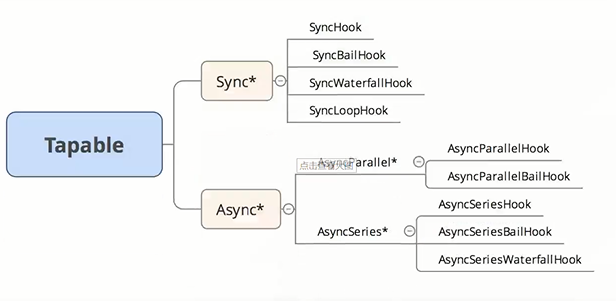
- yarn add tapable
const {
  SyncHook,
  SyncBailHook,
  SyncWaterfallHook,
  SyncLoopHook,
  AsyncParallelHook,
  AsyncParallelBailHook,
  AsyncSeriesHook,
  AsyncSeriesBailHook,
  AsyncSeriesWaterfallHook,
} = require("tapable");
let { SyncHook } = require("tapable");
class Lesson {
  constructor() {
    this.hooks = {
      arch: new SyncHook("name"),
    };
  }
  tap() {//注册监听函数
    this.hooks.arch.tap("node", function (name) {
      console.log("node", name);
    });
    this.hooks.arch.tap("react", function (name) {
      console.log("react", name);
    });
    start(){
      this.hooks.arch.call('jw')
    }
  }
}

const l = new Lesson()
l.tap() // 注册两个事件
l.start(); // 启动钩子
- SyncHook 同步的钩子
class SyncHook {
  //构子的同步问题
  constructor(args) {
    //args=>['name']
    this.tasks = [];
  }
  tap(name, task) {
    this.tasks.push(task);
  }
  call(...args) {
    this.tasks.forEach((task) => task(...args));
  }
}

let hook = new SyncHook(["name"]);
hook.tap("react", function (name) {
  console.log("react", name);
});
hook.tap("node", function (name) {
  console.log("node", name);
});
hook.call("jw");
- SyncBailHook 保险钩子
class SyncBailHook {
  //构子的同步问题
  constructor(args) {
    //args=>['name']
    this.tasks = [];
  }
  tap(name, task) {
    this.tasks.push(task);
  }
  call(...args) {
    let ret;
    let index = 0; //当前要执行第一个
    do {
      ret = this.tasks[index++](...args);
    } while (ret === undefined && index < this.tasks.length);
  }
}

let hook = new SyncBailHook(["name"]);
hook.tap("react", function (name) {
  console.log("react", name);
  return "停止执行"; //如果返回的不是undefined 就停止执行
});
hook.tap("node", function (name) {
  console.log("node", name);
});
hook.call("jw");
- SyncWaterfallHook 瀑布函数结果传到下一个
class SyncWaterfallHook {
  //构子的同步问题
  constructor(args) {
    //args=>['name']
    this.tasks = [];
  }
  tap(name, task) {
    this.tasks.push(task);
  }
  call(...args) {
    let [first, ...others] = this.tasks;
    let ret = first(...args);
    others.reduce((a, b) => {
      return b(a);
    }, ret);
  }
}

let hook = new SyncWaterfallHook(["name"]);
hook.tap("react", function (name) {
  console.log("react", name);
  return "reactok"; //如果返回的不是undefined 就停止执行
});
hook.tap("node", function (name) {
  console.log("node", name);
  return "node ok";
});

hook.tap("webpack", function (name) {
  console.log("node", name);
  return "";
});
hook.call("jw");
- SyncLoopHook 同步遇到某个不反悔 underfined 的监听函数会多次执行
class SyncLooplHook {
  //构子的同步问题
  constructor(args) {
    //args=>['name']
    this.tasks = [];
  }
  tap(name, task) {
    this.tasks.push(task);
  }
  call(...args) {
    this.tasks.forEach((task) => {
      let ret;
      do {
        ret = task(...args);
      } while (ret !== undefined);
    });
  }
}

let hook = new SyncLooplHook(["name"]);
let total = 0;

hook.tap("react", function (name) {
  console.log("react", name);
  return ++total == 3 ? undefined : "继续";
});
hook.tap("node", function (name) {
  console.log("node", name);
});

hook.tap("webpack", function (name) {
  console.log("node", name);
  return "";
});
hook.call("jw");
- 异步的钩子 (串行)并行 需要等待所有并发的异步事件执行后在执行回调方法
- 同时发送多个请求
- 执行方法为 tap 注册(同步) tapAsync 注册
- tapable 库中有三种注册方法 tap 同步注册 tapAsync(cb) tapPromise(注册的是 promise)
- 调用方法 call callAsync promise
let { AsyncParallelHook } = require("tapable");

class Lesson {
  constructor() {
    this.index = 0;
    this.hooks = {
      arch: new AsyncParallelHook(["name"]),
    };
  }
  tap() {
    this.hooks.arch.tap("node", (name, cb) => {
      console.log("node", name);
      setTimeout(() => {
        console.log("node", name);
        cb();
      }, 1000);
    });
    this.hooks.arch.tap("react", (name, cb) => {
      setTimeout(() => {
        console.log("react", name);
        cb();
      }, 1000);
    });
  }
  start() {
    this.hooks.arch.callAsync("jw", function () {
      console.log("end");
    });
  }
}
- AsyncParralleHook 异步并行的钩子
class AsyncParralleHook {
  constructor(args) {
    this.tasks = [];
  }
  tapAsync(name, task) {
    this.tasks.push(task);
  }
  callAsync(...args) {
    //promise.all
    let finalCallback = args.pop(); //拉出最终的函数
    let index = 0;
    const done = () => {
      index++;
      if (index === this.tasks.length) {
        finalCallback();
      }
    };
    this.tasks.forEach((task) => {
      task(...args, done);
    });
  }
}

let hook = new AsyncParralleHook(["name"]);
let total = 0;

hook.tapAsync("react", function (name, cb) {
  console.log("react", name);
  cb();
});
hook.tapAsync("node", function (name, cb) {
  console.log("node", name);
  cb();
});
hook.callAsync("jw", function () {
  console.log("end");
});
let { AsyncParallelHook } = require("tapable");
class Lesson {
  constructor() {
    this.index = 0;
    this.hooks = {
      arch: new AsyncParallelHook(["name"]),
    };
  }
  tap() {
    this.hooks.arch.tapPromise("node", (name) => {
      return new Promise((resolve, reject) => {
        setTimeout(() => {
          console.log("node", name);
          resolve();
        }, 1000);
      });
    });
  }
}
- AyncParralleBailHook(); 带保险的异步并发的钩子
串行的钩子
let { AsyncSeriesHook } = require("tapable");
class Lesson {
  constructor() {
    this.index = 0;
    this.hooks = {
      arch: new AsyncSeriesHook(["name"]),
    };
  }
  tap() {
    this.hooks.arch.tapAsync("node", (name, cb) => {
      setTimeout(() => {
        console.log("node", name);
        cb();
      }, 1000);
    });
    this.hooks.arch.tapAsync("react", (name, cb) => {
      return new Promise((resolve, reject) => {
        setTimeout(() => {
          console.log("react", name);
          cb();
        });
      });
    });
  }
  start() {
    this.hooks.arch.callAsync("jw").then(function () {});
  }
}
npm link
// 当前这个包 放到全局下,生成一个命令
npm link

npm link zf-pack //将全局的包映射到本地

npx zf-pack //npx webpack