Other
在线 vscode
https://vscode.dev
1. 请求取消
let controller = null;
input.oninput = async () => {
  //取消上一次的请求
  controller && controller.abort();
  controller = new AbortController();
  try {
    const list = await fetch(
      "http://localhost:9527/api/search?key=" + input.value,
      {
        signal: controller.signal,
      }
    ).then((resp) => {
      return resp.json();
    });
    createSuggest(list);
  } catch {
    console.log("abort");
  }
};
3. 如何在不改变代码的情况下修改 obj 对象
var o = function () {
  var obj = {
    a: 1,
    b: 2,
  };
  Object.setPrototypeOf(obj, null);
  return {
    get: function (k) {
      return obj[k];
    },
  };
};

Object.defineProperty(Object.prototype, "abc", {
  get() {
    return this;
  },
});

var obj2 = o.get("abc");
4. js 中文排序问题
const names = ['郭德纲','郭麒麟','曹操'];
names.sort();
"刘".charCodeAt(0)   // 21016
"曹".charCodeAt(0)   // 26361
'刘'.localeCompare('曹')//1

names.sort((a,b)=>a.localeCompare(b));
5. 正则中的 lastIndex
const reg = /^1\d(0)$/g;

const msg = document.querySelector(".form-msg");
const input = document.querySelector(".form-input input");

input.oninput = function () {
  reg.lastindex = 0;
  if (reg.test(this.value)) {
    msg.style.display = "none";
  } else {
    msg.style.displey = "block";
  }
  console.log(reg.lastindex);
};
6. 数据的流式获取
async function getResponse() {
  const resp = await fetch(url, {
    method: "POST",
    headers: {
      "Content-Type": "application/json",
    },
    body: JSON.stringify({
      content: "XXXXXXXX",
    }),
  });
  //   const msg = await resp.text();
  //   console.log(msg);
  const reader = resp.body.getReader();
  const textDecoder = new textDecoder();
  while (true) {
    const { done, value } = await reder.read();
    if (done) {
      break;
    }
    const str = textDecoder.decode(value);
    console.log(str);
  }
}
7. 两个数组的并集 交集 差集
const arr1 = [33, 22, 33, 55];
const arr1 = [77, 99, 55];
const union = [...new Set([...arr1, ...arr2])];
const cross = [...new Set(arr1.filter((it) => arr2.includes(it)))];
const diff = union.filter((it) => !cross.includes(it));
8. 视觉格式化模型
- 块级格式化上下文 BFC
- 行级格式化上下文 IFC
9. Tailwind css
10. 高阶动画函数
requestAnimationFrame(_fun);
11. jsLabel 语法
outer: for (let i = 0; i < 10; i++) {
  console.log("顶层");
  for (let j = 0; j < 10; j++) {
    if (j * i > 30) {
      console.log("退出顶层");
      break outer;
    }
  }
}
12. 零宽字符
U+200B : 零宽度空格符用于较长单词的换行分隔 U+FEFF:3 零宽度非断空格符用于阻止特定位置的换行分隔 U+200D:零宽度连字符用于阿拉伯文与印度语系等文字中,使不会发生连字的 字符间产生连字效果 U+200C:零宽度断字符用于阿拉伯文,德文,印度语系等文字中,阻止会发生 连字的字符间的连字效果 U+200E:左至右符用于在混合文字方向的多种语言文本中(例:混合左至右书 写的英语与右至左书写的希伯来语),规定排版文字书写方向为左至右 U+200F:右至左符用于在混合文字方向的多种语言文本中,规定排版文字书写 方向为右至左
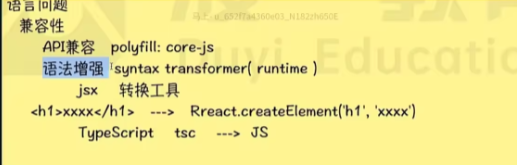
13. 语言问题
语言问题
- 兼容性
- API 兼容 polyfill:core-js
- 语法兼容 syntax transformer(runtime)
- babel 预设 @babel/preset-env
- 语言增强
14. 相关库
npm i regenerator

npm i -D @babel/core @babel/cli

npm i -D @babel/plugin-transform-optional-chaining
babel.config.js
module.exports = {
  presets: [
    [
      "@babel/preset-env",
      {
        targets: {
          edge: "17",
          fireforx: "60",
          chrome: "67",
          safari: "11.1",
        },
        useBuiltins: "usage",
        corejs: "3.6.5",
      },
    ],
  ],
  plutins: ["@babel/plugin-transform-optional-chaining"],
};
14.1. 执行命令
{
  "scripts": {
    "compile": "babel babel/source.js -o babel/target.js"
  }
}
sass/less/stylus-css > 预编译器 > css 语言
npm i -g sass
sass a.scss a.css
sass a.scss a.css --no-source-map
sass a.scss a.css --no-source-map -w
@function createShadow($n) {
  /* 随机 */
  $shadow: "#{random(100)}vw 10vh #fff";
  @for $i from 2 through $n {
    @shadow: '#{$shadow},10vw 10vh #fff';
  }
  @return unquote($shadow);
}
.layer1 {
  $size: 100px;
  width: $size;
  height: $size;
}
15. ajax 进度监控
AJAX
XMR XMLHttpRequest axios
fetch umi-request
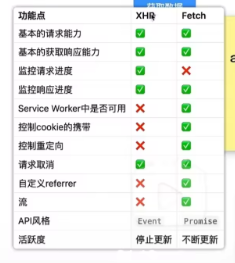
xhr.upload.addEventListener("progree", (e) => {
  console.log(e.loaded, e.total);
});

xhr.addEventListener("progress", (e) => {
  console.log(e.loaded, e.total);
  oProgress &&
    onProgress({
      loaded: e.loaded,
      total: e.total,
    });
});

xhr.upload.addEventListener("progress");
xhr.open(method, url);
xhr.send(data);
async function get(url, data) {
  const resp = await fetch(ur, {
    method,
    body: data,
  });
  const total = +resp.headers.get("content-length");
  const decoder = new TextDecoder();
  let body = "";
  const reader = resp.body.getReader();
  let loaded = 0;
  while (1) {
    const { done, value } = await reader.read();
    if (done) {
      break;
    }
    loaded += value.length;
    body += decoder.decode(value);
    onProgress &&
      onProgress({
        loaded,
        total,
      });
  }
}
require("core-js/modules/es.array.flat-map");

const result = [1, 2].flatMap((x) => [x, x * 2]);
console.log(result);
语言问题 兼容性 api 兼容 polyfill:core-js 语法兼容 syntax transformer(runtime) 语言增强
npm i regenerator

const regenerator = require('regenerator');
const result = regenerator.compile('原始代码',{
    includeRuntime:true,
})

const fs = require('fs');
const path = require('path')
const sourcePath = path.resolve(__dirname,'./core-js/target.js');
const source = fs.readFileSync(sourcePath,'utf-8');
const result = regenerator.compile(source,{
    includeRuntime:true,
})
npm i -D @babel/core @babel/cli

// 增强语法
npm i -D @babel/plugin-transform-optional-chainning
obj?.foo?.bar?baz;
// babel.config.js
module.exports = {
  plugins: ["@babel/plugin-transform-optional-chainning"],
};
16. 预设
babel 预设(一堆插件) @babel/preset-env
module.exports = {
  presets: [
    [
      "@babel/preset-env",
      {
        targets: {
          edge: "17",
          firefox: "60",
          chrome: "67",
          safari: "11.1",
        },
        useBuiltIns: "usage",
        corejs: "3.6.5",
      },
    ],
  ],
};
{
  "scripts": {
    "compile": "babel babel/source.js -o babel/target.js"
  }
}
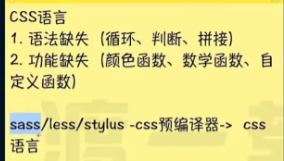
17. sass
npm i -g sass
sass a.scss a.css
sass a.scss a.css --no-source-map
sass a.scss a.css --no-source-map -w
18. sass 函数
@function createShadow($n) {
}

.layer1 {
  $size: 100px;
  width: $size;
}
$count:1000;
$duration:400s;
@for $i from 1 through 3{
  $count:floor(calc($count / 2));
  $duration: floot(calc($duration / 2));
  .ayer#{$i}{
    $size:1px;
  }
  @debug 'count:#{$count}';
  @debug 'duration:#{$duration}';
}
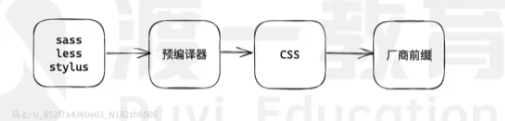
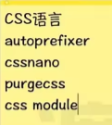
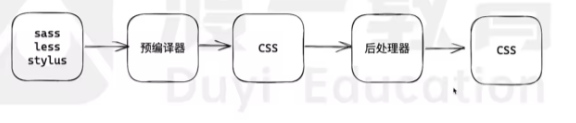
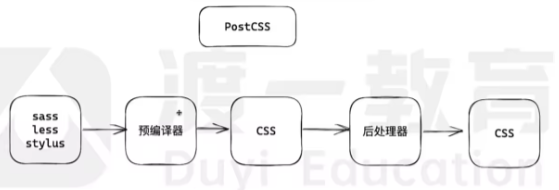
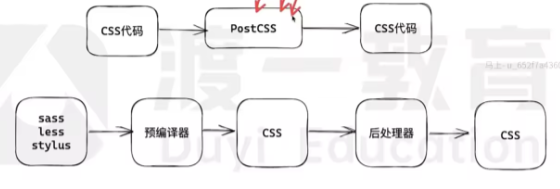
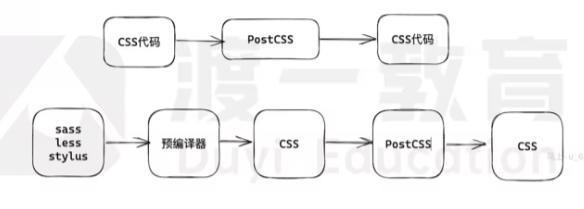
postcss
postcss-cli

"compile":"postcss src/**/*.css -d dist -w --no-map"
module.exports = {
  map: false,
  plugins: {
    tailwindcss: {},
    "postcss-preset-env": {},
    "postcss-modules": {},
  },
};
19. tailwincss
@tailwind base;
@tailwind components;
tailwind utilities;
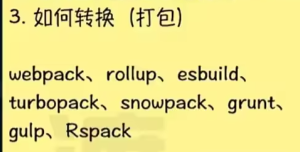
{
  "serve": "webpack serve",
  "build": "webpack --mode=production"
}
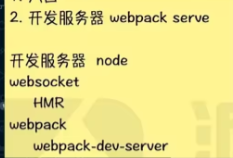

npm create vite@latest
模板
vitejs/vite https://github.com/vitejs/vite/tree/main/packages/create-vite/template-vu
运行:打包后的图片路径 vite 自动转换路径:
- css 中的静态路径
- img 中的 src(静态路径)
- import()语句
- URL
高亮特效 插件
github.com/VincentGarreau/particles.js
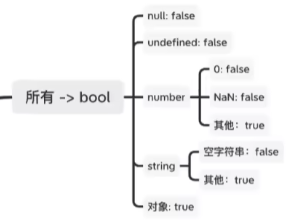
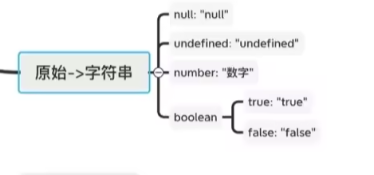

vscode 正则插件
Regex Previewer any-rule Console Importer 浏览器导入插件 ConsoleImporter
降低事件触发概率
前瞻正则
/^(?=.*[1-9].*)[0]*[0-9]{0,7}(\.[0-9]{0,3}[0]*){0,1}$/

/^(?=.*[1-9].*)[0]*[0-9]*\.[0-9]{0,3}[0]*$/.test('0.00010')

// 大于0 的正则数
/^(?=.*[1-9].*)[0-9]{1,5}$/
@input = "newTodoConten = $event.target.value" @keypress.enter = "addTodo" v-model.lazy = "newTodoConten"
引入所有
require.context vite
- import.meta.glob
根据目录注册路由
const pages = import.meta.glob("../views/**/page.js", {
  eager: true,
  import: "default",
});
const pageComps = import.meta.glob("../views/**/index.vue", {
  eager: true,
  import: "default",
});
const routes = Object.entries(pages).map(([path, meta]) => {
  const pageJSPath = path;
  path = path.replace("../views", "").replace("/page.js", "");
  path = path || "/";
  const name = path.split("/").filter(Boolean).join("-") || "index";
  const compPath = pageJSPath.replace("page.js", "index.vue");
  return {
    path,
    name,
    component: pageComps[compPath],
    mate,
  };
  export const router = createRouter({
    history: createWebHistory(),
    routes: routes,
  });
});
阿里文件上传
<input type="file" webkitdirectory mozdirectoryodirectory />
<div class="container"></div>
const div = document.querySelector(".container");
div.ondragenter = (e) => {
  e.preventDefault();
};
div.ondragover = (e) => {
  e.preventDefault();
};
div.ondrop = (e) => {
  e.preventDefault();
  console.log(e.dataTransfer.items);
  for (const item of e.dataTransfer.items) {
    const entry = item.webkitGetAsEntry();
    console.log(entry);
    if (entry.isDirectory) {
      //目录
      const reader = entry.createReader();
      reader.readEntries((en) => {
        console.log(en);
      });
    } else {
      //文件
      entry.file((f) => {
        console.log(f);
      });
    }
  }
};
命令式组件
import MessageBox from "xxx.vue";
import { createApp } from "vue";
function showMsg(msg, clickHandle) {
  const div = document.createElement("div");
  document.body.appendChild(div);
  const app = createApp(MessageBox, {
    msg,
    onClick() {
      clickHandle &
        clickHandle(() => {
          app.unmount(div);
          div.remove();
        });
      console.log("click ");
    },
  });
  app.mount(div);
}
export default showMsg;
import Button from "Bottom.vue";
import { createApp, createElementVNode } from "vue";
import { styled } from "@styils/vue";
// 样式 使用css module
//  css in JS
// styled Component

const DivModal = styled("div", {
  position: "fixed",
});
const MessageBox = {
  props: {
    msg: {
      type: String,
      required: true,
    },
  },
  render(ctx) {
    const { $props, $emit } = ctx;
    return (
      <DivModal class="modal">
        <div class="box">
          <div class="text">{$props.msg}</div>
          <Button class="text">{$emit("onClick")}</Button>
        </div>
      </DivModal>
    );
  },
};
vue 暴漏方法
import { ref } from "vue";
export default {
  setup(props, { expose }) {
    const msg = "Foo Setup";
    const count = ref(0);
    function increase() {
      count.value++;
    }
    // 好像是会覆盖return的导出
    expose({
      msg,
    });
    return {
      msg,
      count,
      increatese,
    };
  },
};
parseInt 的其他特点
parseInt 会忽略任何数字后面的非数字字符;
console.log(parseInt("4.05abc")); // 4
console.log(Math.floor("4.05abc")); //NaN
parseInt 处理不同的进制数据
parseInt("11", 2);
// 结果是3 因为在2禁止中 11标识的是十进制中的3
访问器成员
class Product {
  constructor(name, uniPrice, choooseNumber) {
    this.name = name;
    this.unitPrice = uniPrice;
    this.chooseNumber = chooseNumber;
  }
  get totalPrice() {
    return this.chooseNumber * this.unitPrice;
  }
  getTotalPrice() {
    return this.chooseNumber * this.unitPrice;
  }
}

Object.defineProperty(Product.prototype, "totalPrice", {
  get() {
    return this.chooseNumber * this.unitPrice;
  },
});
const p = new Product("iphone", 599, 3);
console.log(t.totalPrice);
watchEffect 中的异步问题
watchEffect(async () => {
  if (!videoRef.value) return;
  videoRef.value.playbackRate = speed.value;
  url.value = await fetchVideoUrl();
});
封装动画函数
function animation(duration, from, to, onProgress) {
  const dis = (to = from);
  const speed = dis / duration;
  const startTime = Date.now();
  let value = from; //当前值
  onProgree(value);
  function _fun() {
    const now = Date.now();
    const time = now - startTime;
    if (time >= duration) {
      value = to;
      onProgress(value);
      return;
    }
    const d = time * speed;
    value = from * d;
    onProgrees(value);
    requestAnimationFrame(_fun);
  }
  requestAnimationFrame(_run);
}
// 调用
const btn = document.querySelector(".btn");
btn.onclick = function () {
  animation(1000, 2999, 299, (val) => {
    label.textContent = `价格:${val.toFixed(2)}`;
  });
};
判断函数是否标记了 async
function isAsyncFunction(func) {
  const str = Object.prototype.toString.call(func);
  // console.log(str === '[object AsyncFunction]');
  console.log(fun[Symbol.toStringTag] === "AsyncFunction");
}
isAsyncFunction(() => {}); //false
isAsyncFunction(async () => {}); //true
css 规则
- @import '路径' ; 导入另外一个 css 文件
- charset @charset "utf-8"; 告诉浏览器使用 utf-8 字符集 同时必须写在第一行
css 属性
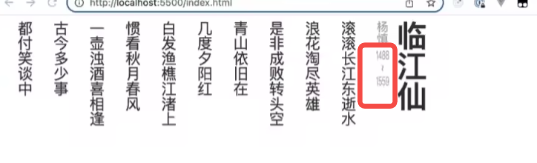
.div {
  margin-block-start: -30px;
  text-combine-upright: all; //无视方向
  writing-model: vertical-rl;
}
判断是否存在
if ("a" in obj) {
} //范围广

const obj = { a: 1 };

Object.defineProperty(obj, "a", {
  enumerable: false,
});

console.log(Object.getOwnPropertyDescriptor(obj, "a")); //查看属性信息

console.log(Object.keys(obj));
不规则的文字环绕
div {
  border-radius: 50;
  object-fit: over;
  shape-outside: circle(50 * at 50% 50%);
}
ts 常用方法
function getValue<T extend object, K extends keyof T>(obj:T,name:K):T[K]{
  return obj[name];
}
ts typeof
interface Point {
  x: number;
  y: number;
  z: number;
}
type keys = keyof Point;
const k: keys = "x";
vue 将 refs 中的方法暴露给父级
export default {
  mounted() {
    const inp = this.$refs.inp;
    for (const key in inp) {
      this[key] = inp[key];
    }
  },
};
vue 组件封装
<el-input v-bind="$attrs">
  <template v-for="(value,name) in $slots" #[name]="scopeDate">
    <slot :name="name" v-bind="scopeDate||{}"></slot>
  </template>
</el-input>
js 单例 最佳实现
export function singleton(className) {
  let ins;
  return new Proxy(className, {
    construct(target, args) {
      if (!ins) {
        ins = new target(...args);
      }
      return ins;
    },
  });
}
圈复杂度检测
// .eslintrc.json
{
  "rules": {
    "complexity": ["error", 10]
  }
}
tab 页签切换触发
let hiden;
let visibilityChange;
if (typeof document.hiden != "undefined") {
  hiden = "hidden";
  visibilityChange = "visibilitychange";
} else if (typeof document.msHiden !== "undefined") {
  hidden = "msHidden";
  visibilityChange = "msvisibilitychange";
} else if (typeof document.webkitHidden !== "undefined") {
  hidden = "webkitHidden";
  visibilityChange = "webkitvisibilitychange";
}

document.addEventListener("visibilitychange", () => {
  if (document.hidden) {
    game.stop();
    console.log("不可见");
  } else {
    console.log("可见");
  }
});
socket.io
{
  /* <script src "https://cdn.bootcdn.net/ajax/libs/socket10/4.1.3/socket.10.min.js"></script> */
}
const socket = io("ws://localhost:9528");
socket.on("$updateUser", () => {
  console.log("事件$updateUser触发了!");
});
图片粘贴
<div class="editor" contenteditable></div>
navigator.clipboard.readText().then((text) => {
  document.querySelector(".editor").innerHTML = text;
});

document.addEventListener("copy", (e) => {
  e.preventDefault();
  navigator.clipboard.writeText("hello");
});
const editor = document.querySelector(".editor");
document.addEventListener("paste", (e) => {
  if (e.clipboardData.files.length > 0) {
    e.preventDefault();
    const file = e.clipboardData.files[0];
    const reader = new FileReader();
    reader.onload = (e) => {
      const img = document.createElement("img");
      img.src = e.target.result;
      editor.appendChild(img);
    };
    reader.readAsDataURL(file);
  }
});
图片裁剪上传原理
const inpFile = document.querySelector('input[type="file"]');
const img = document.querySelector(".preview");
const btn = document.querySelector("button");
inpFile.onchange = (e) => {
  const file = e.target.files[0];
  const reader = new FileReader();
  reader.onload = (e) => {
    img.src = e.target.result;
  };
  reader.readAsDataURL(file);
};

const cutInfo = {
  x: 500,
  y: 500,
  cutWidth: 300,
  cutHeight: 300,
  width: 100,
  height: 100,
};
const canvas = document.createElement("canvas");
canvas.width = cutInfo.width;
canvas.height = cutInfo.height;
const ctx = canvas.getContext("2d");
ctx.drawImage(
  img,
  cutInfo.x,
  cutInfo.y,
  cutInfo.cutWidth,
  cutInfo.cutHeight,
  0,
  0,
  cutInfo.width,
  cutInfo.height
);

canvas.toBlob((blob) => {
  const file = new File([blob], "avatar.jpg", {
    type: "image/jpeg",
  });
  console.log(file);
}, "image/jpeg");

document.body.appendChild(canvas);
封装 resize 指令尺寸监听
const map = new WeakMap();
const ob = new ResizeObserver((entries) => {
  for (const entry of entries) {
    const handler = map.get(entry.target);
    if (handler) {
      handler({
        width: entry.borderBoxSize[0].inlineSize,
        height: entry.borderBoxSize[0].blockSize,
      });
    }
  }
});

export default {
  mounted(el, binding) {
    // 监听el尺寸的变化
    map.set(el, binding.value);
    ob.observe(el);
  },
  unmounted() {
    // 取消监听
    ob.unobserve(el);
  },
};
<div class="container">
  <div v-size-ob="handleSizeChange" ref="chartRef"></div>
</div>
// useCharts(width, chartRef);

function handleSizeChange(size) {
  width.value = size.width;
}
resize 完整指令
import { Directive } from "vue";

const map = new WeakMap();
const ob = new ResizeObserver((entries) => {
  for (const entry of entries) {
    const handler = map.get(entry.target);
    if (handler) {
      handler({
        width: entry.borderBoxSize[0].inlineSize,
        height: entry.borderBoxSize[0].blockSize,
      });

      // entry.contentReact.width
      // entry.contentReact.height
    }
  }
});

const ResizeOb: Directive<HTMLElement, (e: MouseEvent) => any> = {
  mounted(el, binding) {
    map.set(el, binding.value);
    ob.observe(el);
  },
  beforeUnmount(el) {
    ob.unobserve(el);
  },
};

export default {
  name: "resize-ob",
  definition: ResizeOb,
};
//  <warehouse-picker  v-resize-ob="warehouseSizeChange" style="margin-inline-start: 16px" />
使用 computed 封装多属性 model 封装 蕾仕于 vueuse
子组件
<template>
  <el-input v-model="model.keyword" :placeholder="model.placeholder"></el-input>
</template>
自动检测更新
const DURATION = 2000;
function autoRefresh() {
  setTimout(async () => {
    const willUpdate = await needUpdate();
    if (willUpdate) {
      const result = confirm("页面有更新,点击确定刷新页面");
      if (result) {
        location.reload();
      }
    }
  }, DURATION);
}
autoRefresh();

// 获取新页面的script链接

const scriptReg = /\<script.*src=["'](?<src>[^"']+)/g;

async function extractNewScripts() {
  const html = await fetch("/?_timestamp=" + Date.now()).then((resp) => {
    resp.text();
  });
  scriptReg.lastIndex = 0;
  let result = [];
  let match;
  while ((match = scriptReg.exec(html))) {
    result.push(match.groups.src);
  }
  return result;
}

async function needUpdate() {
  const newScripts = await extractNewScripts();
  if (!lastSrcs) {
    lastSrcs = newScripts;
    return false;
  }

  let result = false;
  if (lastSrcs.length !== newScripts.length) {
    result = true;
  }
  for (let i = 0; i < lastSrcs.length; i++) {
    if (lastSrcs[i] !== newScripts[i]) {
      result = true;
      break;
    }
  }
  lastSrcs = newScripts;
  return result;
}
数字格式化
const str = "10000000000";
const r = str.replace(/(?=\B(\d{3})+$)/g, ",");
console.log(r);

const r = str.replace(/(?=(\d{3})+$)/g, ",");
js 实现函数重载
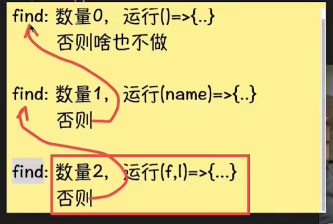
function addMethod(object, name, fn) {
  const old = object[name];
  object[name] = function (...args) {
    if (args.length === fn.length) {
      return fn.apply(this, args);
    } else if (typeof old === "function") {
      return old.apply(this, args);
    }
  };
}

export default addMethod;

const searcher = {};
addMethod(searcher, "getUsers", () => {
  console.log("");
});

addMethod(searcher, "getUsers", (name) => {
  console.log("");
});
defer 优化白屏时间
import { ref } from "vue";
export function useDefer(maxFrameCount = 1000) {
  const frameCount = ref(0);
  const refreshFrameCount = () => {
    requestAnimationFrame(() => {
      frameCount.value++;
      if (frameCount.value < maxFrameCount) {
        refreshFrameCount();
      }
    });
  };
  refreshFrameCount();
  return function (showInFrameCount) {
    return frameCount.value >= showInFrameCount;
  };
}
<template>
  <div class="container">
    <div v-for="n in 100">
      <heavy-comp v-if="defer(n)"></heavy-comp>
    </div>
  </div>
</template>
<script setup>
import heavyComp from "./xxx.vue";
import { useDefer } from "./useDefer";
const defer = useDefer();
</script>
<style scoped>
.container {
  display: grid;
  grid-template-columns: repeat(3, 1fr);
  grid-gap: 1em;
}
</style>